Datadog Auto-Processing automatically structures logs from any source
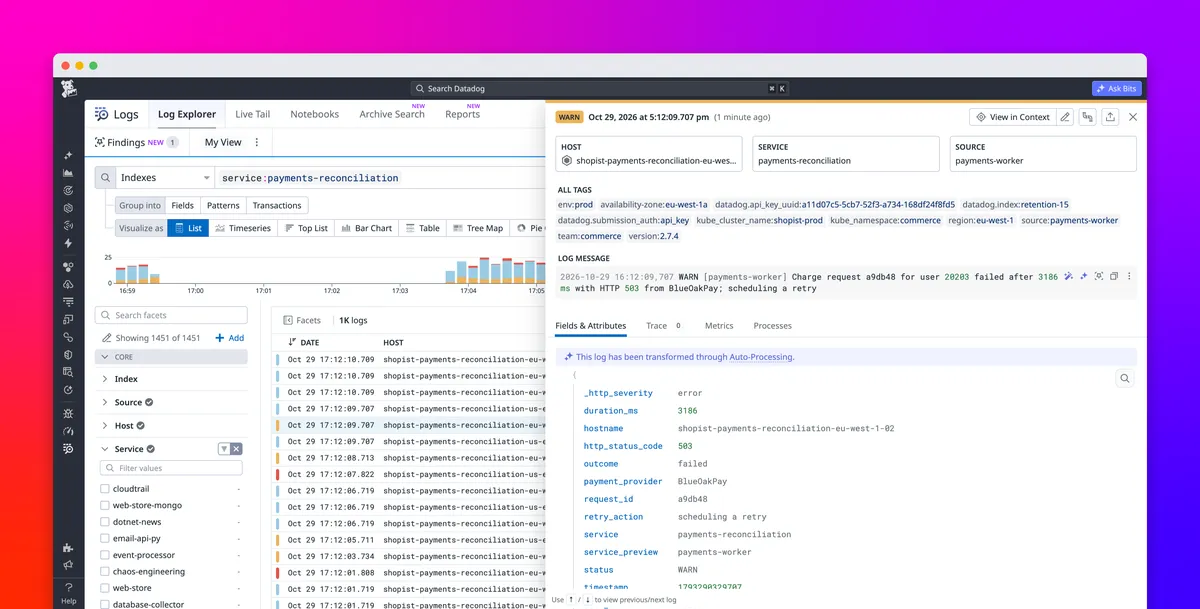
Datadog has made Auto-Processing generally available, a capability that automatically structures logs from custom sources without requiring teams to build and maintain parsing pipelines. The company says it can detect processing gaps, generate parsing rules and adapt them as application log formats change.
- Auto-Processing is generally available.
- It detects unprocessed logs and creates parsing pipelines automatically.
- The process takes about 1 hour when confidence and risk thresholds are met.
- It normalizes attributes including timestamp, status and service.
- It adapts managed pipelines when log formats change.
Automatic parsing for unstructured logs
Logs from custom sources may contain useful details without presenting them as structured attributes. Traditionally, engineers have had to write and debug parsing rules, map standard attributes and update pipelines when applications change. When a format drifts, dashboards and monitors that depend on extracted attributes can stop working.
Datadog Auto-Processing is designed to handle that work automatically. When incoming logs do not have an applicable pipeline, it identifies the logs that need processing, generates the parsing needed to structure them and applies the pipeline. Teams do not need to initiate pipeline creation, write parsing rules or approve the generated pipeline before it takes effect.
According to Datadog, the system applies a pipeline when confidence and risk scores meet a required threshold. The process of detecting a processing gap, generating new pipeline rules and applying them takes about 1 hour.
Structured attributes support investigations and dashboards
Datadog illustrates the feature with a payments-reconciliation service that produces a log containing a failed charge request, a user identifier, a payment provider, an HTTP response and a duration. Auto-Processing can extract those values into attributes, allowing engineers to filter by provider, investigate a specific user or isolate requests that returned HTTP 502.
Numeric attributes such as request latency and transaction duration can also be used for aggregations and graphs. This can help teams compare average latency across providers, track response times over time and build monitors for requests that exceed a threshold.
Auto-Processing also maps information to Datadog core attributes, including timestamp, status, service, trace ID and span ID. This allows teams to analyze logs from services with different formats using common filters and time windows. The resulting structured data can be used in Log Explorer, for log-based metrics, in Flex Logs or archives, and when forwarding processed logs to other destinations.
Adapting when application logs change
Automatic pipeline creation addresses the initial work of structuring a new log format, but Datadog says Auto-Processing also adapts pipelines it manages as those formats change. If a deployment causes a service's log format to drift, the system can detect the change and adapt parsing rules.
That behavior is intended to help preserve attributes used by dashboards and monitors. In Datadog's example, a service's status attribute remains available after a format change, reducing the need for engineers to discover every change and update the corresponding rules themselves.
Datadog says Auto-Processing is aimed at helping teams keep logs structured for searches, monitors, dashboards, metrics and other workflows. The company directs users to its Auto-Processing documentation. People without a Datadog account can start processing and analyzing logs with a 14-day free trial, according to the announcement.
Datadog: Get useful logs from any source with Datadog Auto-Processing