LanceDB’s lancify package converts image datasets into Lance format
LanceDB has introduced lancify, a Python package that converts image datasets into Lance format with a single function call or a command-line interface. The package is designed to replace a more manual workflow based on Google Colab notebooks and custom scripts.
- lancify converts image datasets into Lance format.
- The package supports optional resizing and dataset splits.
- Datasets can be converted with Python or a CLI.
- Metadata such as filenames, labels and splits is extracted automatically.
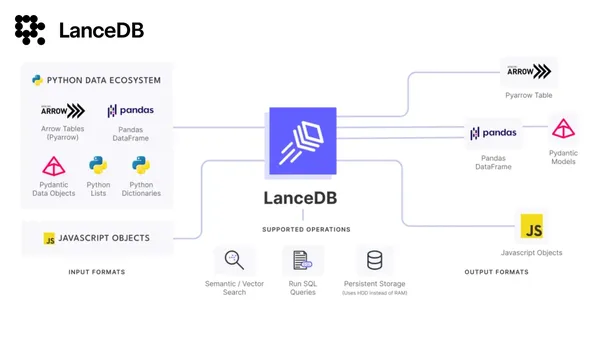
- Converted Lance data can be loaded into Pandas.
A simpler route to Lance datasets
The package can be installed with pip install lancify. After installation, users can import convert_dataset from lancify.converter and provide the path to an image dataset.
The conversion process supports optional image resizing and dataset splits. In the example provided by LanceDB, images are resized to 256x256 and processed across train, test and valid splits. Resizing is optional, and users can pass None to preserve the original image dimensions.
For datasets without predefined splits, lancify organizes images by classification labels and creates a single Lance file containing the images and their corresponding labels. When splits are available, the package saves Lance files for each split.
What lancify handles automatically
According to LanceDB, convert_dataset reads image files and extracts metadata including the filename, category and data split. It then converts the images into Lance format with an appropriate schema.
Behind the scenes, the image data and metadata are packaged into PyArrow RecordBatch objects for columnar storage. Those records are written to Lance datasets, which the company describes as optimized for performance and storage.
This abstracts away several steps that previously had to be handled manually, including iterating through directories, creating schemas and writing data to Lance files. LanceDB presents the package as a more concise alternative to the earlier Google Colab workflow.
Python and command-line workflows
Users can work with lancify programmatically or through its CLI SDK. The CLI is available after installing the package with pip, after which users can run the lancify command in a terminal and follow its arguments.
Once a dataset has been converted, it can be loaded into Pandas. LanceDB’s example opens a Lance dataset with the lance Python library, converts it to a table and then creates a Pandas data frame with to_pandas().
For machine-learning users, the change reduces conversion boilerplate and provides a direct path from image directories to a columnar dataset format. LanceDB says this can make data loading and processing quicker, particularly for large image datasets, although the source does not provide benchmark figures.
LanceDB: Python Package to convert image datasets to Lance type