Microsoft Foundry extension for Azure Developer CLI reaches 1.0
Microsoft has made the Microsoft Foundry extension bundle for Azure Developer CLI generally available at version 1.0. The extension adds agent setup and local testing to azd’s existing resource provisioning and application deployment workflow.
- The Microsoft Foundry extension bundle for azd is generally available at version 1.0.
- It adds hosted-agent setup and local testing through Agent Inspector.
- Agent and deployment settings are defined in azure.yaml alongside application code.
- The workflow supports evaluation assets and CI/CD deployment.
- Provisioned resources and model usage incur Azure charges.
Agent configuration stays with application code
Azure Developer CLI, also known as azd, provisions Azure resources and deploys application code. The Microsoft Foundry extension adds tools for setting up agents and testing them locally, while keeping agent and deployment configuration in azure.yaml.
That arrangement lets developers review agent and deployment changes together in the same pull request. Teams can also use the same deployment definition locally and in CI/CD, with each azd environment supplying its target subscription, region and resource settings.
The extension supports hosted agents, which run the developer’s agent code on managed compute in Foundry. Developers choose the framework and orchestration logic, while Foundry manages the runtime. The documented setup requires Azure Developer CLI 1.37.0 or later, a current uv release and Python 3.13 or later for the sample. It also requires an Azure subscription, Foundry permissions and model quota in the selected region. Provisioned resources and model usage incur Azure charges.
From local testing to hosted deployment
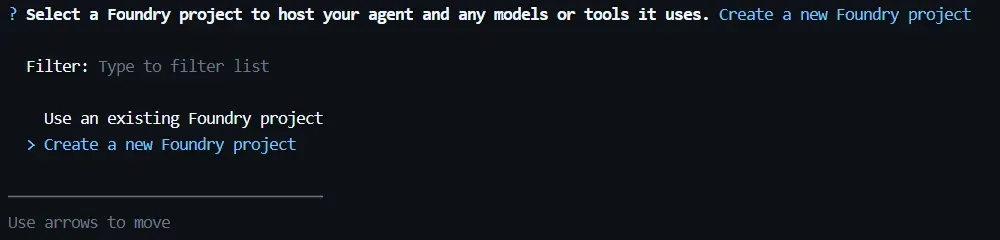
The walkthrough starts with azd ai agent init, which initializes a Python Agent Framework sample in an empty directory and lets developers select a new or existing Foundry project. The resulting azure.yaml describes the agent, its source and runtime, compute allocation, model deployment and dependency on the Foundry project.
Developers can run azd provision to create the declared resources, including missing model deployments in a reused project. The command presents model-configuration options such as Global Standard and Data Zone Standard, although available options and quota vary by subscription and region.
For local testing, azd ai agent run installs dependencies and opens Agent Inspector. Model calls still use the Azure deployment, while developers can invoke the local agent from a second terminal. When ready, azd deploy uploads the source to Foundry for a remote build, so a local container build is not required. The workflow also includes commands for previewing hosted-agent changes, streaming logs and diagnosing setup or permission issues.
Evaluation and CI/CD support
The extension can be combined with the Evaluations extension to generate test data and a grading rubric for a deployed agent. Developers can keep the evaluation dataset, rubric and configuration with their code, compare changes and reuse checks in CI/CD. The source also says azd ai agent optimize can use a configured evaluation as its baseline, with candidates reviewed before one is explicitly deployed.
For automation, azd up packages, provisions and deploys the project. The azd pipeline config command sets up authentication, repository settings and a workflow for GitHub Actions or Azure DevOps. Microsoft advises granting the pipeline identity the required Azure permissions, using a separate azd environment per stage and keeping runtime credentials in pipeline secrets.
The Microsoft Foundry Skill also supports coding agents such as GitHub Copilot and Claude Code with Foundry-specific workflows for project setup and local testing. Together, these features give developers a path from scaffolding and local inspection to hosted deployment, evaluation and repeatable delivery, while retaining the configuration and test assets alongside the application code.
Microsoft Foundry: Microsoft Foundry extension for Azure Developer CLI is generally available