Databricks adds Agent Memory to Agent Bricks, now in Beta
Databricks has introduced agent memory on Agent Bricks, its agent developer platform, and made it available in Beta. According to the company, the feature stores facts, preferences and workflows that an agent should remember, which improves quality while cutting costs and latency.
- Databricks launched Agent Memory on Agent Bricks, available in Beta and running on Lakebase.
- It is built on MemCurrent, combining plugins, on-demand tools and an offline dreaming pipeline.
- In internal benchmarks, Databricks says agent pass rate tripled with 31% fewer tokens.
- Memories are stored in the customer's Lakebase project, and developers can read, export and delete them.
- The Agent Bricks CLI can deploy an agent with memory and sessions, according to Databricks.
What Agent Memory does
Databricks says agents without memory tend to rediscover key facts, forget user preferences and repeat mistakes they were already corrected on. Many developers build their own memory solutions in response, but face design questions such as where to store memories, how to synthesize them and how to retrieve them.
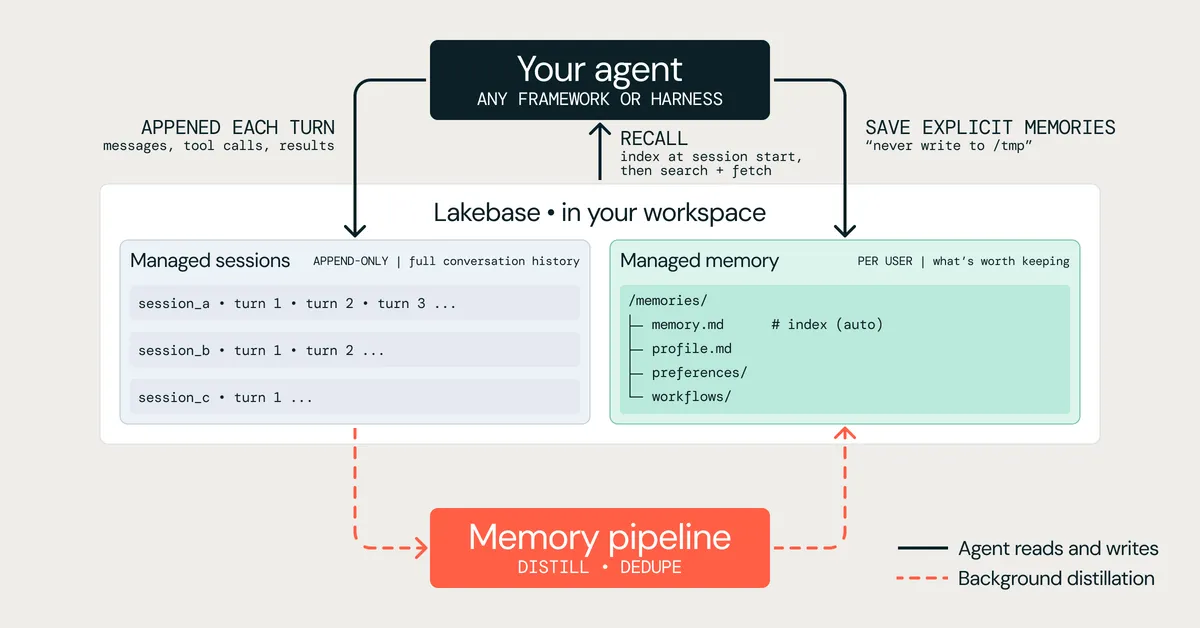
Databricks Agent Memory is built on the MemCurrent architecture, which the company says was pioneered by Databricks Research. MemCurrent combines three access patterns: plugins that log and load context automatically, tools the agent calls on demand, and an offline dreaming pipeline that consolidates memory in the background. The service runs on Lakebase, Databricks' serverless Postgres, which the company says keeps latency low.
In its internal benchmarks, Databricks reports that this architecture tripled agent pass rate on real enterprise tasks while using 31% fewer tokens.
The problem with stateless agents
Databricks describes two issues that appear once an agent moves from a demo to daily use. The first is cost: a stateless agent re-derives what it worked out the day before, such as which table holds usage data or which join works. In one real session from the company's research, an agent needed 11 tool calls, 8 subagents and nearly six minutes to answer a question about one product's top customers, and would have repeated all of it the next day.
The second is a lack of personalization. When a user states a preference or corrects a mistake, the agent forgets it when the session ends.
Databricks also points to the weaknesses of two common workarounds:
- Replaying the full history into context. On open-source memory benchmarks, according to Databricks, full context used about 12x more input tokens per question than a well-designed memory at the same accuracy, and it scored worse on the longest histories because irrelevant turns confused the agent.
- Building memory on object storage or a vector database. This leaves teams owning extraction, deduplication, retrieval and access control, and memories can go stale or contradict each other.
Three parts and a research base
Agent Memory has three components. Managed sessions record each conversation as an ordered history of messages, tool calls and results, in the native format of the developer's framework. Managed memory keeps profile, preferences, domain knowledge and workflows. At the start of a session the agent loads an index of what is known, and during the session it finds details with hybrid keyword and semantic search. Memory pipelines distill sessions into memory in the background, either on demand or on a regular basis. They extract durable facts and preferences, remove duplicates and replace facts that newer conversations contradict.
The system is a production implementation of the research paper "MemCurrent: Designing Memory for Enterprise Agents". Its central finding, according to Databricks, is that memory works best in two layers: a raw record of what happened, and a distilled record of what is worth remembering, kept current by a background process rather than written ad hoc by the agent mid-task. Databricks says the same infrastructure already powers memory in Genie, its natural-language experience for business users.
What it means for developers
Databricks lists several practical effects. In the example above, once the workflow was saved to memory, the agent answered a related follow-up in 2 tool calls and 41 seconds, down from 11 tool calls and nearly six minutes. Preferences, corrections and team-specific definitions carry across sessions, scoped to each user.
Sessions and memories live in the customer's Lakebase project, independent of any single agent framework. Developers can read, export and delete the entries an agent keeps about each user, and can give a memory pipeline instructions, for example "keep durable customer preferences; ignore one-off debugging notes."
Databricks says no new infrastructure is needed, and that the Agent Bricks CLI can deploy an agent with memory and sessions in minutes. Agent Memory joins agent hosting, Databricks Sandbox, Unity Gateway, pre-built MCP servers, and tracing and evaluation within Agent Bricks. The company has published a quickstart and a tutorial for adding memory to an existing agent. As the feature is in Beta, and the performance figures come from Databricks' own benchmarks, teams will want to test it on their own workloads.
Databricks: Introducing Agent Memory on Databricks