Databricks brings Unity Catalog metric views to Power BI
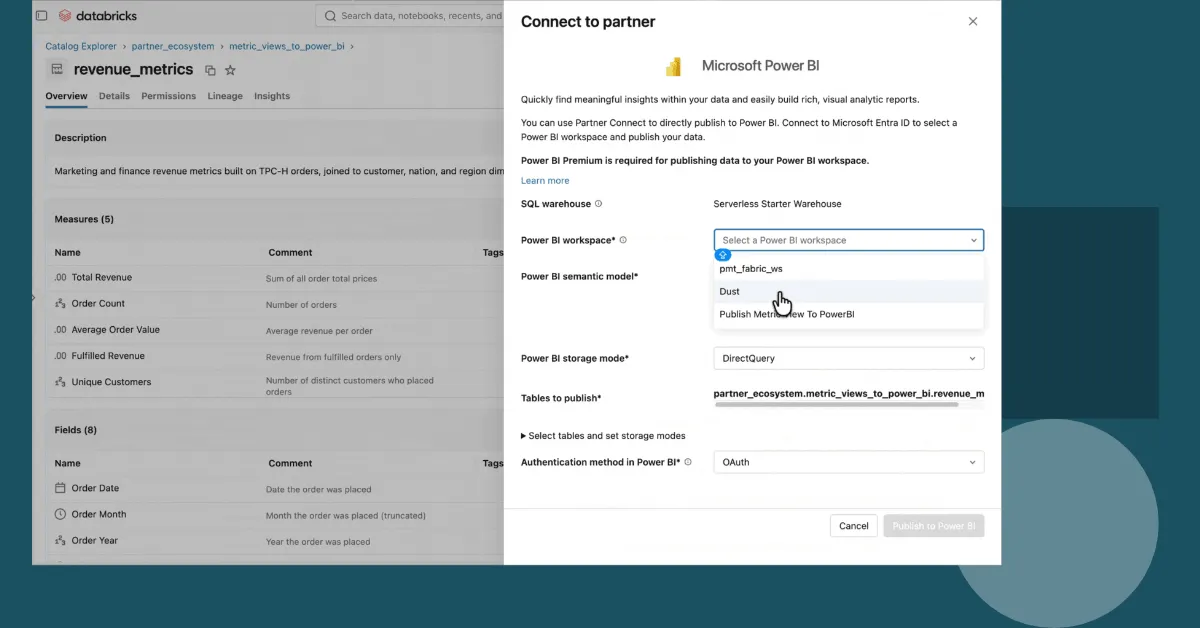
Databricks is bringing Unity Catalog metric views to Power BI, allowing organizations to define business metrics once in Databricks and use them in Power BI reports, AI/BI dashboards, and Genie. The integration is available in Private Preview.
- Unity Catalog metric views can be published to Power BI semantic models.
- Dimensions become Power BI columns and measures become DAX measures.
- DirectQuery preserves Unity Catalog access controls and security policies.
- Lakeflow Jobs can automate updates to Power BI models.
- Publish to Power BI is available in Private Preview.
One definition for metrics across BI and AI
Databricks says the integration is designed to address a common governance problem: organizations often maintain separate semantic models across many Power BI workspaces, while individual teams recreate metrics and relationships in different tools. That can cause reports to use different definitions for measures such as revenue, margin, and active customers.
With Unity Catalog Semantics, metric views, relationships, and other modeling metadata can be kept in Unity Catalog. Teams define business KPIs in Databricks, then publish them to Power BI semantic models. The same governed definitions can also be used by AI/BI dashboards and Genie, helping teams work from consistent numbers.
According to Databricks, business users can build self-service Power BI reports and explore metrics across dimensions without waiting for a data team to recreate the model or write DAX. Data teams maintain the underlying definition in Databricks rather than updating multiple copies across systems.
How metric views appear in Power BI
When a Unity Catalog metric view is published, it becomes a table in the Power BI semantic model. Its dimensions, also called fields, become columns, while its measures become DAX measures. Power BI queries the metric view itself, and joins defined in the metric view run in Databricks.
Databricks says joined dimensions, such as campaign channel or region, appear as ordinary columns in Power BI, so users do not need to rebuild those relationships there. In the example provided by the company, a campaign_performance metric view includes channel and region dimensions, along with measures for total spend, total revenue, and return on ad spend.
If a team changes the definition of total revenue, it can update the metric view once. A Power BI task in a Lakeflow Job can then republish the model, allowing reports to receive the updated definition without manually changing each copy.
Governance, performance, and automated updates
DirectQuery is the default storage mode, allowing Power BI to query governed lakehouse data through Lakehouse//RT or Databricks SQL. Databricks says Unity Catalog row filters, column masks, and ABAC policies continue to apply, while lineage remains connected to metrics used in AI/BI dashboards, Genie, and Databricks Lakehouse.
The company also says Power BI will be able to benefit from metric view materialization. This optimization pre-computes results without changing how metrics are calculated. If a matching materialization exists, Databricks can serve the query from it. Otherwise, the query runs against the metric view as usual, with the same definitions and results.
Organizations can publish metric views on demand through Catalog Explorer or automate publishing with Power BI tasks in Lakeflow Jobs. Those tasks can run on a schedule or after upstream tables refresh. Updated measures, new measures, and new dimensions can flow into Power BI automatically.
Private Preview availability
Publish to Power BI is available in Private Preview. Databricks says customers should work with their account team to test it.
The setup involves preparing metric views by adding measure inputs as dimensions and naming every field, selecting Publish > Publish to Power BI in Catalog Explorer, signing in with Power BI credentials, and choosing a target workspace. Users can then validate that the metric view appears as a table, with dimensions as columns and measures as DAX measures. For production workflows, Databricks recommends adding a Power BI task to a Lakeflow Job so the Power BI semantic model stays aligned with the metric view.