Datadog Export Pipelines send RUM and Product Analytics data to your cloud
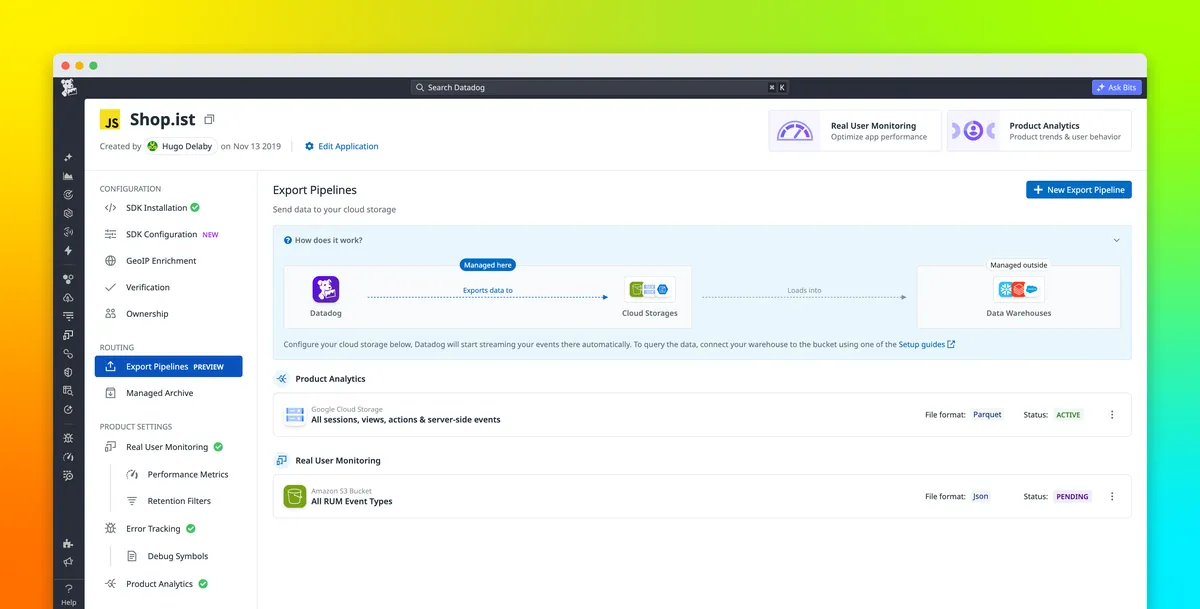
Datadog has introduced Export Pipelines, a native way to continuously send Real User Monitoring (RUM) and Product Analytics data from Datadog to a customer's own cloud storage. Teams can pick Amazon S3, Azure Blob Storage, or Google Cloud Storage as the destination, according to Datadog.
- Export Pipelines continuously send RUM and Product Analytics data from Datadog to Amazon S3, Azure Blob Storage, or Google Cloud Storage.
- Parquet and JSON formats are supported, and files are organized by date and hour.
- Pipelines are configured in the Datadog UI and show a status of Active, Error, Pending, or Paused.
- Datadog cites warehouse analytics, ML model training, and long-term compliance retention as use cases.
- RUM has 30-day standard retention and Product Analytics has 15-month retention, according to Datadog.
How Export Pipelines work
Datadog RUM and Product Analytics help engineering and data teams understand application availability and performance, as well as user behavior, based on user session data. Teams can ingest that data into Datadog for monitoring and analysis. According to Datadog, they may also need the event data in infrastructure they control, for example to support custom analytics and reporting, machine learning (ML) workflows, or long-term data access.
Export Pipelines are meant to cover that need. Users configure the pipeline from the Datadog UI, select the performance or behavioral data they want to export, and choose a destination in Amazon S3, Azure Blob Storage, or Google Cloud Storage. Once the pipeline is set up, Datadog continuously sends matching events to that destination. Datadog says this removes the need for teams to maintain custom export scripts or scheduled jobs.
File formats, organization and pipeline status
Two file formats are supported: Parquet and JSON. Datadog says Parquet loads directly into Snowflake, BigQuery, and Databricks without preprocessing. JSON suits teams that have their own processing pipelines or need a more flexible representation of each event.
Files are organized by date and hour in the storage location. Downstream processes can therefore target files from the relevant time period instead of scanning every exported file.
Export configurations can be enabled, disabled, or updated as requirements change. The Export Pipelines page shows each pipeline's current state, which can be Active, Error, Pending, or Paused, so users can check whether their pipelines are running as expected.
Use cases: analytics, ML and retention
Datadog describes three main uses for the exported data:
- Warehouse analytics: An analytics team could export Product Analytics events to a Google Cloud Storage bucket and load the Parquet files into BigQuery. Analysts could then join application actions and user behavior with datasets such as subscriptions, account attributes, or financial data, without introducing a second set of application instrumentation.
- Machine learning: Data science teams can send RUM and Product Analytics events to cloud storage and use their own transformation and modeling pipelines to train models for personalization, churn prediction, recommendations, or anomaly detection.
- Compliance-driven retention: Export Pipelines can help organizations that must keep long-term access to event data in infrastructure they control.
On retention, Datadog states that RUM provides standard 30-day retention and offers 6-month storage with RUM Managed Archive, while Product Analytics provides 15-month retention. Organizations that need access beyond these periods can export the relevant events to cloud storage and apply their own storage, access, and life-cycle policies.
What it means for users
For teams already using Datadog RUM or Product Analytics, Export Pipelines offer a built-in route to move session and behavior data into their own warehouses and ML tooling instead of building and running custom export code. Datadog says the data stays available in the format and destination that works best for each workflow.
The company points users to the Export Pipelines documentation for details. New customers can sign up for a 14-day free trial to try exporting RUM and Product Analytics data to their cloud storage.
Datadog: Export RUM and Product Analytics data with Export Pipelines