Google's Agents CLI adds extensions so teams can use LangChain and custom policies
Google has added an Extension System to Agents CLI, letting developers override or add commands without forking the tool. According to Google, version 1.8.0 also ships a first-party LangChain extension, so teams can use the CLI's deployment, evaluation and observability work without adopting Agent Development Kit (ADK).
- Agents CLI now has an Extension System, available since version 1.5.0, to override or add commands without forking.
- Version 1.8.0 ships a first-party LangChain extension that replaces the framework-coupled commands.
- Extensions are Git directories with one agents-cli-extension.yaml file, with no central registry.
- Commit SHAs are pinned in a lockfile so CI and local runs use identical code.
- The system is experimental in v1.8.0, and Google advises pinning the Agents CLI version.
Why Google built an extension system
Google launched Agents CLI at Google Cloud Next '26 around a single idea: going from an idea to a production agent on Google Cloud should take one unified command surface. For teams using ADK, Google says the path works: run agents-cli create, write the agent logic, and ship to Cloud Run with observability and evals wired up in about thirty minutes.
The framework landscape has since become more varied. Besides ADK, developers choose LangChain and LangGraph, newer options such as Deep Agents, or in-house frameworks built for a specific business domain. Enterprise admins may also want to enforce governance policies across the agent development lifecycle, for example a compliance scan, an SSO gate or a Model Risk Management hop.
The authors, Pier Paolo Ippolito and Elia Secchi, describe three poor options when a toolchain is tied to one framework: fork the CLI and carry a permanent maintenance burden, wrap it in custom scripts that developers and their coding assistants may bypass, or build everything from scratch, which can take several engineer-months.
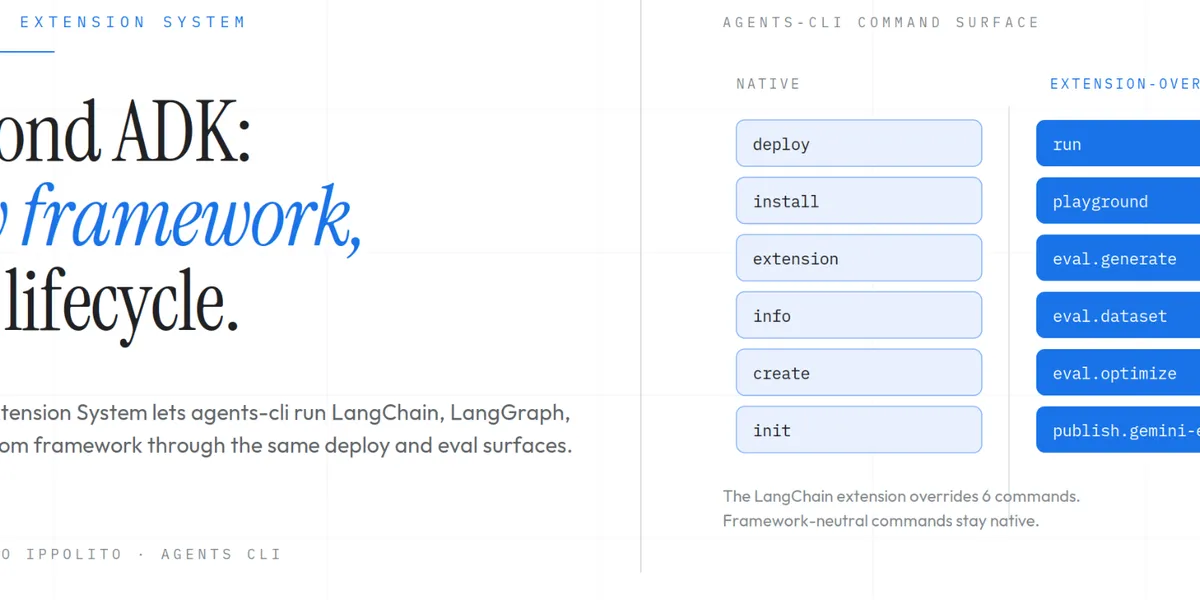
Google also points to a split inside the tool itself. Six commands assume the ADK runtime: playground, run and four eval subcommands. The other eighteen or so, including scaffold, infra, deploy, publish and login, are framework-agnostic. Without extensions, picking a non-ADK framework for one project meant losing access to all twenty-four.
How extensions work
An extension is a directory in a Git repository containing a single file, agents-cli-extension.yaml. The file declares which built-in commands it overrides and which new commands it adds. An override replaces a built-in such as playground, deploy or eval generate and receives the user's arguments verbatim, so the experience matches the native command. A new command appears as agents-cli <your-command>. Both can live in the same extension.
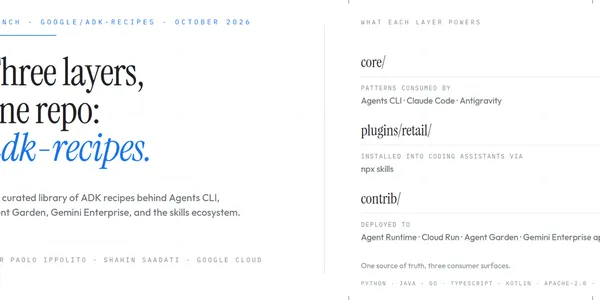
Distribution runs through Git rather than a dedicated package registry, a design Google says draws on the extension model of the gemini-cli project. There is no central index and no package format to maintain. Any directory in any Git repository can be an extension, and Git handles versioning, pinning and distribution. Enterprise platform teams can create an internal platform-extensions repository and point developers at it.
Extensions can be referenced in several ways:
- First-party shorthand, resolved to the google/agents-cli repository, with agents-cli extension add <name>
- Any GitHub organization or repository, including self-hosted Git servers, such as acme/platform-extensions
- A fragment such as #soc2-deploy to pick one extension from a repository that holds several
- A local path, typically used during extension development
There are two install scopes. The default project scope commits the extension and its lockfile entry to the project repository, so teammates and CI pick it up on checkout. The user scope, enabled with the --global flag, applies to every project on the machine and suits extensions needed before a project exists. If both scopes define the same command, the project scope wins, and agents-cli info shows the source of each active command. Google says the system will not silently merge or override extensions, and conflicts surface at install time or in the extension list.
Lockfile, LangChain and what to watch
The system follows the discipline of package managers like uv or npm. It resolves a Git reference to an exact commit SHA at install time and records it in a lockfile. The agents-cli install command restores the vendored copy from the pinned SHA without advancing it, which Google says guarantees CI and local development run bit-for-bit identical code. Running agents-cli extension update re-resolves the reference and re-prompts for third-party trust.
Extensions arrived with version 1.5.0. Version 1.8.0 adds the first-party LangChain extension, which replaces the framework-coupled commands with LangChain equivalents and leaves the rest of the lifecycle untouched. The post walks through scaffolding, running, deploying and evaluating a LangChain agent, then builds a small custom extension that wraps the deploy command with a Software Bill of Materials (SBOM) scan, as a pattern for platform teams enforcing their own policies.
One caveat applies. The Extension System is marked experimental in v1.8.0, and Google says the manifest schema and command surface may still change in breaking ways. Teams that depend on it should pin their Agents CLI version.
For teams on LangChain or in-house frameworks, the change means they can keep Agents CLI's deployment and lifecycle tooling without moving to ADK. For regulated organizations, it offers a way to enforce deploy, login or evaluation requirements centrally without maintaining a fork.