HitPaw FotorPea V6.0.0 Adds AI Upscaling and Denoise Tools
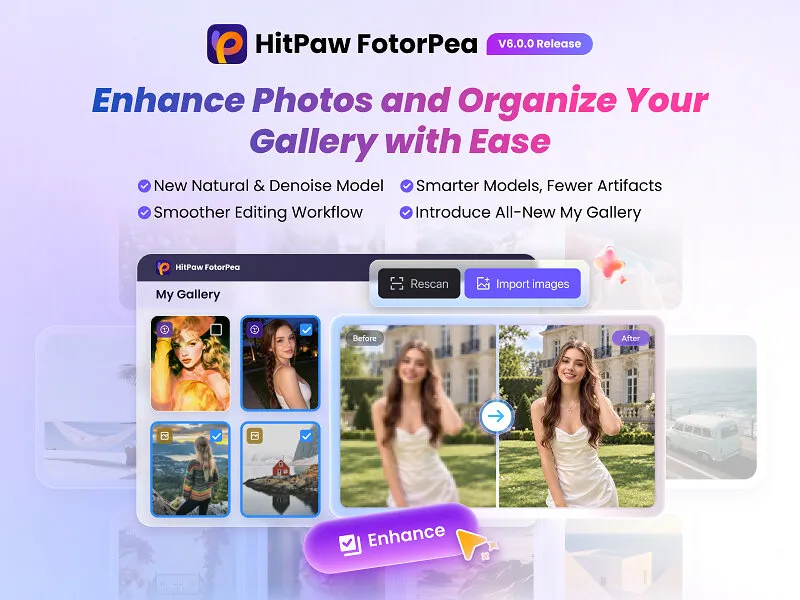
HitPaw has released FotorPea V6.0.0 with three AI image enhancement tools designed to improve low-resolution, AI-generated and noisy images. The update also adds My Gallery for organizing edits and Credit History for tracking credits.
- FotorPea V6.0.0 adds Natural Upscale, AI Upscale and AI Denoise.
- AI Upscale is designed for AI artwork, anime, illustrations and line art.
- My Gallery organizes edited images and supports side-by-side comparisons.
- Plans start at $22.39/month for Windows and $25.59/month for Mac.
- The software supports Windows 11/10/8/7 64-bit and macOS 10.15 and above.
Three tools target different image problems
According to HitPaw, Natural Upscale combines upscaling, sharpening and denoising in one process. The company says it is designed to improve blurry, compressed and low-quality images while restoring textures and clarity during enlargement.
The tool also aims to reduce repetitive patterns and artificial-looking details, which HitPaw says can produce more natural-looking textures at higher resolutions. Its enhanced detail reconstruction is intended to restore texture when users enlarge low-resolution images.
AI Upscale is optimized for AI-generated images, anime, illustrations and line art. It combines the More-Detail GAN and Smooth models to balance added texture with smooth areas. HitPaw says the feature increases resolution while retaining an image's original artistic style, making the results more suitable for creative projects and printing.
AI Denoise and new image management features
FotorPea V6.0.0 also introduces AI Denoise, including the Denoise-Max option. HitPaw says the feature reduces visible noise while reconstructing important image details and preserving textures, avoiding results that look overly smooth.
The company describes AI Denoise as particularly useful for portraits and high-quality photos with visible noise or delicate textures. This positions the tool for photo refinement where noise reduction needs to be balanced against detail retention.
For managing results, My Gallery keeps edited images in one gallery and provides quicker access to previously edited photos. It also supports side-by-side comparisons, allowing users to review enhancement results. The release additionally lists Credit History as a way to make credit tracking more transparent.
Compatibility, pricing and intended users
HitPaw describes FotorPea as an AI-powered image enhancement solution with tools for improving image quality, restoring details, generating images from text prompts and refining visuals through smart editing features. The company says the product is intended for creators, professionals and everyday users.
FotorPea V6.0.0 is compatible with Windows 11, 10 and 8/7 in 64-bit versions, as well as macOS 10.15 and above. Subscription plans start at $22.39/month for Windows and $25.59/month for Mac, according to the release.
The update gives users separate workflows for natural enlargement, AI artwork enhancement and noise reduction, while My Gallery adds tools for organizing and comparing the resulting images. These additions expand FotorPea's image-quality focus without changing the product's broader role as HitPaw's image enhancement and creative editing solution.