JetBrains Brings Air Agent Workspace to Its IDEs
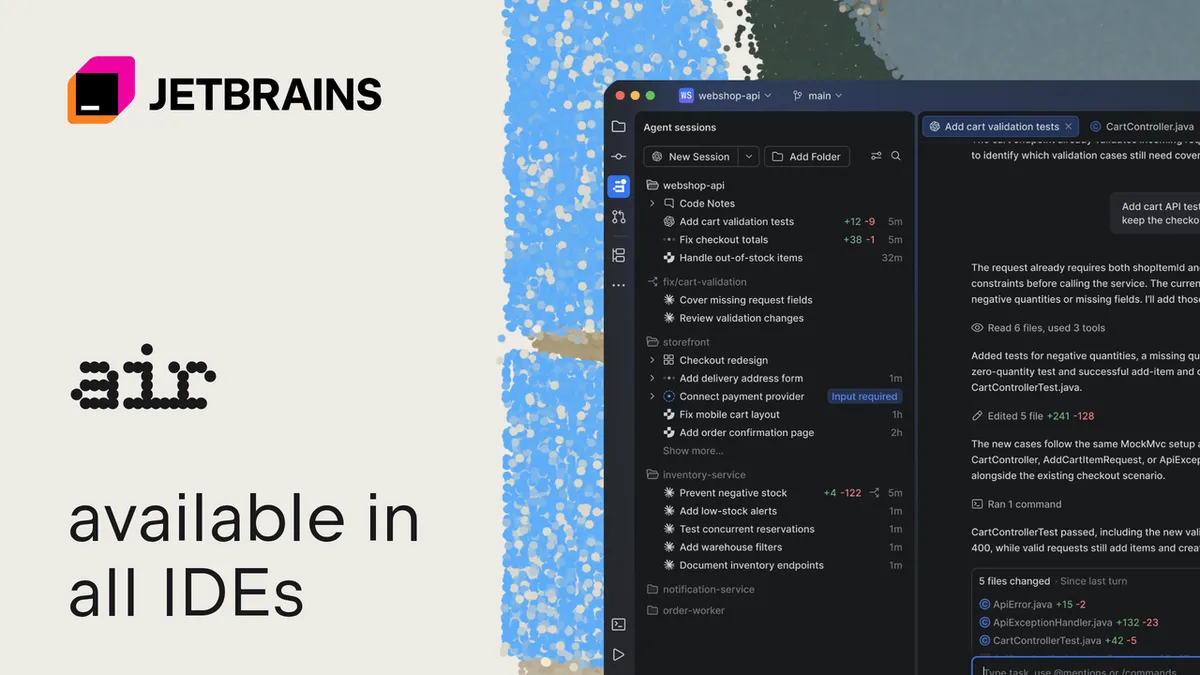
JetBrains has made its Air agent workspace available in JetBrains IDEs with the 2026.3 release. Air lets developers run supported coding agents inside the IDE, track their work, review changes, and provide feedback while keeping control of the development process.
- Air is available in JetBrains IDEs from version 2026.3.
- It supports parallel agent sessions, worktrees, notifications, and review panels.
- Supported agents include Junie, Codex, Claude Agent, GitHub Copilot, and Gemini.
- Junie is available with its Lite configuration for free through Air.
- A paid JetBrains AI subscription is not required for local agent workflows.
A workspace for coding agents
JetBrains says Air is designed for a development environment in which agents write more code and developers spend more time reviewing the results. The company cites the Atlassian State of Developer Experience Report 2026, which found that 49% of developers spend four or more hours a week reviewing AI output and correcting prompts.
Air brings agent sessions into the IDE, where developers can follow work across projects, see which agents need input, and receive notifications about unread results. Each agent can use its own local Git worktree, helping parallel sessions avoid conflicts while allowing developers to review changes in the usual way.
Developers can also save an agent, model, and instructions as a preset. This allows them to start recurring types of tasks without configuring each session from the beginning.
Review tools and support for multiple agents
Air supports agents including Junie, Codex, Claude Agent, and GitHub Copilot, and connects to other compatible agents through ACP. The supported options listed by JetBrains also include Gemini, DeepSeek, OpenCode, Cursor, Pi, Grok, Kimi, and Kilo.
After an agent finishes, developers can open a review panel, navigate the changed code, run inspections and tests, or use the debugger. Code Notes can be attached to specific lines to ask questions or request changes, with the relevant code context sent back to the session. JetBrains says Code Notes also work with terminal agents.
Through the IDE's MCP server and built-in skills, supported agents can check inspections, run builds and run configurations, query databases, and use native refactorings. In IntelliJ IDEA and CLion, they can also drive the debugger. The IDE provides access to debugging, profiling, database management, and semantic code search.
Free Junie access and existing workflows
A paid JetBrains AI subscription is not required for Air's local agent workflows. Users can connect a supported provider account or API key, or sign in with a JetBrains Account to use Junie with its free Lite configuration. JetBrains says provider charges, usage limits, and fair-use terms still apply.
Air also supports using a Claude Pro or Max subscription with Claude Code in its terminal surface. Code completion continues to work in the editor and does not count against the JetBrains AI quota. Air can appear as a tool window on the right or as an editor tab, while AI Assistant remains available as a separate supported plugin until early 2027.
Air is available from JetBrains IDE version 2026.3. JetBrains says it does not automatically start agents or send code to an AI provider. Developers choose and authorize an agent, after which data handling depends on the selected agent, provider, and applicable terms.
JetBrains AI: JetBrains IDEs Transformed for the Agentic Era of Development – With Air