Kilo launches MCP server to give coding agents access to its platform
Kilo has released the Kilo MCP server, a remote MCP server that lets any MCP-compatible coding agent work directly with the Kilo platform's API. According to Kilo, agents can now handle usage data, agent profiles and cloud agents that were previously reachable only through the web app.
- Kilo released a remote MCP server exposing its platform API to any MCP-compatible client, including the Kilo CLI and VS Code extension.
- The server offers two tools: search for finding endpoints in the API catalog and call for running them.
- Agents can query usage and spend, manage agent profiles, and control the cloud agent lifecycle.
- Setup uses a kilo.json entry, the URL https://mcp.kiloapps.io/mcp and an OAuth sign-in.
- Kilo plans to add tools for the actions agents repeat most.
What the Kilo MCP server does
Kilo says coding agents can already read a repository, run tests and open pull requests, but the Kilo platform itself sat outside their reach. Usage data, agent profiles and cloud agents all lived behind the web app. The new server changes that by putting the platform's API in front of any client that speaks MCP, including the Kilo CLI and the Kilo VS Code extension.
Users describe what they want in plain language, and the agent finds the right endpoint and calls it. The connection acts as the signed-in user rather than as one fixed organization, so people who belong to several organizations should name the one they mean in the prompt.
Setup and design
Setup takes two steps. Users add the server to their kilo.json as a remote MCP entry pointing to https://mcp.kiloapps.io/mcp, then run kilo mcp auth kilo. A browser window opens for sign-in, followed by a second tab where the user picks a personal account or an organization. Other clients are pointed at the same URL and complete an OAuth sign-in.
Kilo says its API is too large to expose as one tool per endpoint, so the MCP offers two tools instead:
- search looks through the API catalog and returns matching endpoints, what each does and the inputs it expects.
- call runs an endpoint from that catalog.
If an agent passes wrong inputs, the error names the missing field, so the agent can correct the call and retry. A simple task usually needs one search and one call. More involved work, such as setting up a cloud agent, can take several searches because the relevant endpoints are in different parts of the API.
Usage, profiles and cloud agents
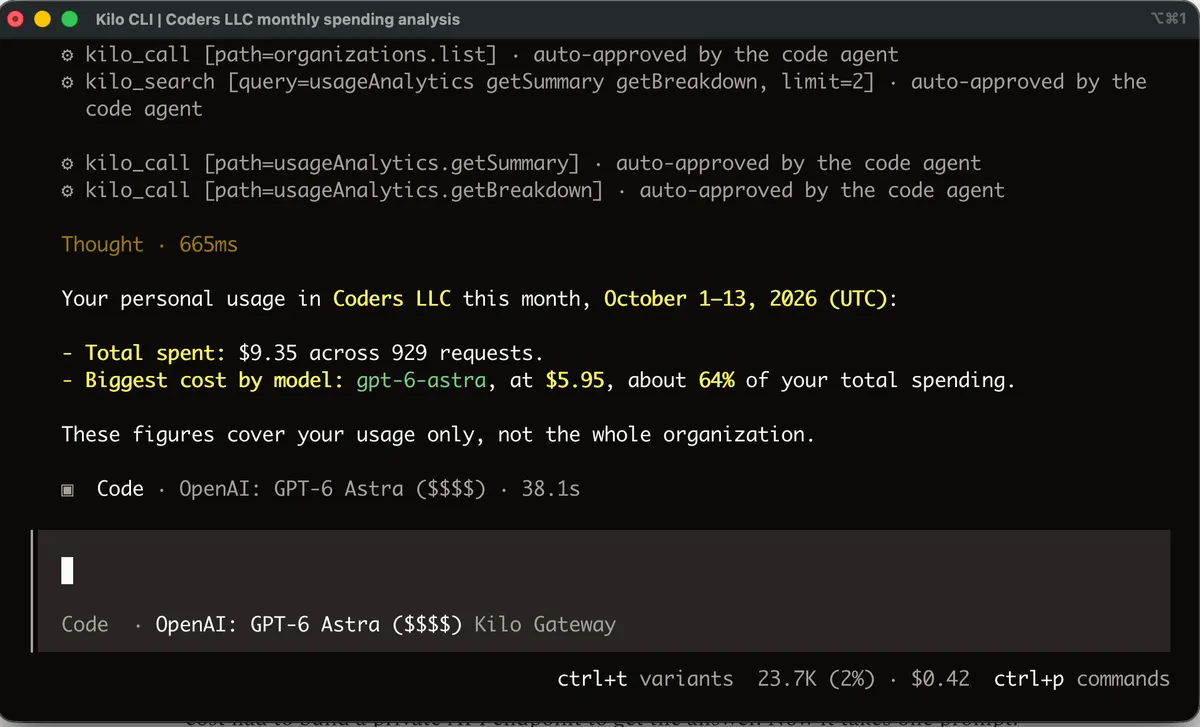
For usage and spend, a user can ask something like "How much have I spent on Kilo this month, and what was the biggest cost?" The agent pulls the usage, totals it and breaks it down by feature, such as the CLI, Agent Manager or code reviews. Usage can also be split by day or by month. Kilo says one of its engineers previously had to build a private API endpoint to find out what his cloud code reviews cost, and now it takes one prompt.
Agent profiles hold the setup agents run with: skills, MCP servers, commands, variables and repository bindings. Through the MCP, an agent can list profiles, read their details, create, update and delete them, and set variables. A question such as "Which of my agent profiles have MCP servers enabled?" gets a one-line answer without clicking through each profile.
The API also covers the cloud agent lifecycle: starting a session, checking status, sending follow-up messages, interrupting and deleting. In internal testing, Kilo says one engineer created a cloud agent, deleted it, recreated it with a different model and reasoning level, sent it instructions and asked to be told when it finished, all from a chat session.
What it means for users
According to Kilo, this is useful for people who would rather not install the Kilo CLI, or who want their agent to hand off work on its own. Small tasks, like adding a field to the admin page, can be sent to a cloud agent to check on later. When the right implementation is unclear, users can have cloud agents try different approaches in their own isolated environments while their laptop stays free.
Kilo says it is watching how agents use the MCP so it can add tools for the actions they repeat most. It asks users to share in the comments or on the Kilo Discord which tasks they want handled better.
Kilo Code: Introducing the Kilo MCP