Databricks Shows How Lakebase Branching Gives Each Coding Agent Its Own Database
Databricks says the database is the overlooked bottleneck when several coding agents work in parallel, and it proposes Lakebase branching as the fix. In a blog post, the company describes a development loop that gives every agent and every pull request its own isolated database branch.
- Databricks says the database is an overlooked bottleneck when coding agents run in parallel.
- Lakebase branches an entire database in under a second using copy-on-write and can scale to zero.
- Git worktrees plus a post-checkout hook create a database branch per agent.
- GitHub Actions creates an ephemeral branch per PR, runs migrations, deploys a preview app and posts a schema diff.
- Lakebase branches are not merged back; schema changes are promoted through migrations such as Drizzle, Flyway, Liquibase or Alembic.
The shared database problem
According to Databricks, running multiple coding agents at once is becoming the norm, and tooling such as skills, hooks, MCPs and subagents has grown around it. The database, however, is often left out. Each concurrent agent needs to write code, apply schema changes and run tests against a database.
In a shared setup, such as a single development or staging database, agents can conflict on schema changes, interfere with one another, or fall back to mocks that do not reflect real-world data. Databricks says these were already pain points for developers, but coding agents make them worse because they move faster, work in parallel and need a safe environment that does not put production data at risk or expose sensitive data.
How Lakebase branching works
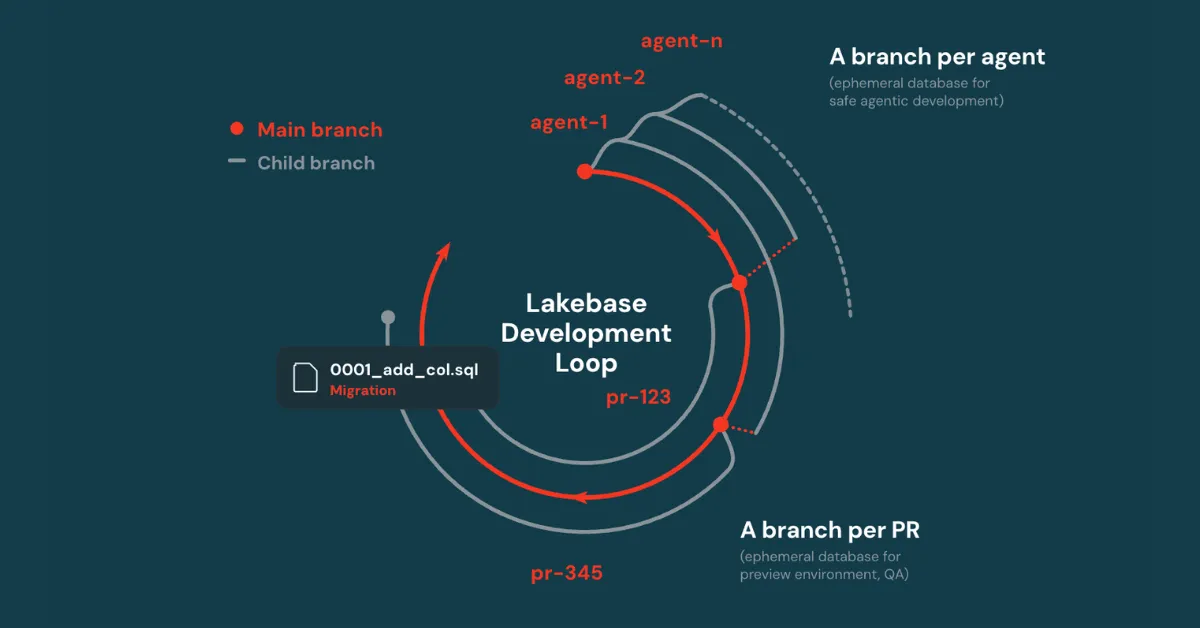
Databricks says its Lakebase Postgres architecture addresses this with database branching. Just as Git branches code, Lakebase can branch an entire database in under a second, regardless of its size. Branches use copy-on-write, so they share the parent branch data and only consume additional storage as they diverge. They can also scale to zero, so idle branches incur no compute cost, which matters when several agents run at the same time.
Each branch is fully isolated. An agent can apply migrations, run tests and retire the branch when it is done. One difference from Git is that Lakebase branches are not merged back into the main branch. Databricks explains that because parent and child can both change independently, reconciling their data can quickly become impractical. Schema changes are instead tracked in code and promoted to the parent through migration tools such as Drizzle, Flyway, Liquibase or Alembic. The example uses Drizzle.
The agent and pull request loop
For local work, Databricks suggests Git worktrees, which give each agent its own directory with its own checked-out branch and avoid file-level conflicts. A post-checkout hook in the repository then creates a database branch for each new worktree. In the example, an agent runs claude -worktree feature-123, Git creates the worktree, the hook fires and the agent ends up with its own code directory and its own database. Agent behavior can be guided through instruction files such as AGENTS.md or CLAUDE.md, including the step of opening a PR when work is finished. Once the PR exists, the worktree and database branch can be retired.
After a PR is opened, GitHub Actions creates an ephemeral Lakebase branch as a child of the production branch. The workflow described is:
- A PR is opened against main.
- CI calls the Lakebase CLI to create a branch such as pr-123.
- The migration tool runs against the new branch.
- A preview app is deployed, pointed at the branch's connection string.
- A schema diff is generated and posted as a PR comment showing which tables, columns or indexes changed.
- The reviewer validates both code and database changes.
- When the PR is closed or merged, CI deletes the branch.
The example deploys the app with Databricks Apps, but Databricks says the concept applies to hosting platforms such as Vercel, Netlify and Cloudflare. An example repository with GitHub Actions workflows is available.
Other uses and what it means
Databricks lists further workflows that are not implemented in the example repository. A branch can be created from production at a point in time, typically right before a bug appeared, so developers can reproduce the issue against real data and retire the branch after validating the fix. Branching can also make schema migrations safer: a branch is created, the migration applied, tests run, and only then is the change promoted to production. Teams can work with production-derived data using Unity Catalog masking, for example, without risking the live database.
Databricks also notes that many teams use one workspace per environment, such as dev, staging and prod, and often branch from a seeded database instead of production to avoid exposing PII. The post uses a single workspace for simplicity.
The company summarizes the approach as the Lakebase development loop: a branch per agent, a branch per PR, and isolated branches for production validation. For teams adopting coding agents, Databricks argues this gives a safe and flexible database foundation for the agentic software development lifecycle.
Databricks: Lakebase and Agentic SDLC: Branching Databases for Coding Agents