Luma Adds Eight One-Click Mini-Apps to Its Luma Agents Workspace
Luma AI has built eight specialized mini-apps into Luma Agents, its AI creative workspace, each designed to change one element of an image or ad without regenerating everything else. The tools cover tasks such as face swaps, relighting, background replacement and ad localization, according to the company.
- Luma Agents now includes eight mini-apps: Face Swap, Camera Angles, Light Transfer, Relight Studio, Virtual Try-On, Background Swap, Ad Variants and Product Shots.
- Each mini-app changes one element and preserves the rest, so no full regeneration is needed, according to Luma.
- Luma Skills let users save multi-step workflows as reusable one-click tools.
- Plus costs $30/month with full mini-app access; Pro costs $90/month and targets agencies.
- Luma says Uni-1 powers image understanding and Ray 3.2 handles video output.
Eight tools for specific creative tasks
According to Luma, the mini-apps are Face Swap, Camera Angles, Light Transfer, Relight Studio, Virtual Try-On, Background Swap, Ad Variants and Product Shots. They are accessible through the Solutions tab in Luma Agents. Each performs a single creative operation and preserves the original elements that are not being edited, so no full regeneration is required.
- Face Swap replaces faces while preserving pose, lighting and composition.
- Camera Angles generates multiple perspectives from one reference image and maintains subject identity across them.
- Light Transfer adjusts lighting using a reference photo or a text description.
- Relight Studio offers manual control through a virtual light rig, with settings for position, type, color, intensity, beam width and shadow softness.
- Background Swap replaces backgrounds while preserving the subject and its edges.
- Virtual Try-On creates on-model garment imagery from uploaded clothing and selected models.
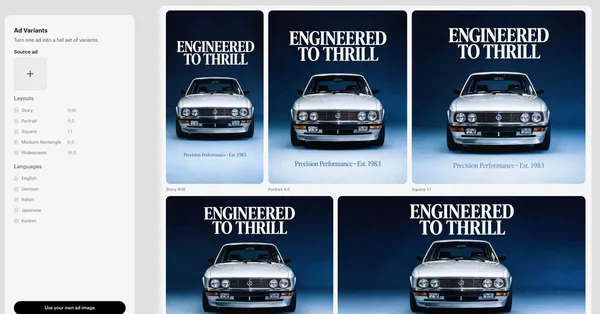
- Ad Variants produces versions of approved ads in different formats, colorways and languages.
- Product Shots places uploaded products into new scenes, matching lighting, shadows and scale. Each run generates three images in a consistent editorial style.
Skills turn workflows into reusable tools
Luma Agents launched in March 2026 as a workspace for projects across image, video, audio and text. Agents keep project context from concept to delivery, including brand guidelines and approved assets, on an infinite visual board where teams can upload references and discuss direction with AI agents.
The mini-apps are paired with Luma Skills, which let users save entire multi-step workflows as one-click tools. Luma gives an example: upload a product image, generate three lifestyle scenes with Product Shots, apply consistent lighting with Light Transfer, create six social formats with Ad Variants, then export with brand-approved naming conventions. Once saved, the company says, the sequence runs in minutes. Agencies can create a Skill per client to encode brand guidelines, preferred styles and format requirements.
Luma also points to a tutorial showing that a complete social media ad can be built from scratch in about 10 minutes. Saved as a Skill, that sequence can be replayed on new content.
The technology behind the editing
Luma says its image intelligence is powered by Uni-1, which treats images not as undifferentiated pixel grids but as structures made of layouts, objects, text, visual identity and spatial relationships. According to the company, this lets the mini-apps modify specific elements while respecting what already exists. When editing with Layers, users isolate the element to change, such as a headline, product or background, and the rest of the image stays locked.
For video, Luma names Ray 3.2, which it describes as providing production-ready output with frame-by-frame creative control, HDR workflows and EXR export. The company says Ray maintains the visual identity established in reference images when a storyboard made with Camera Angles moves into video production.
Use cases, pricing and what it means
Luma describes several scenarios. A beverage brand could adapt one hero shot for six markets using Face Swap for talent, Background Swap for environment and Ad Variants for translated copy. A fashion retailer could use Virtual Try-On to test different model demographics, poses and locations without physical photoshoots. For product pages, a team could upload a packshot once and generate lifestyle imagery across several contexts.
The interface is visual: users upload assets, select options and generate outputs, with no development resources needed. Luma says a junior designer can run localization variants, an art director can test lighting options and a producer can generate storyboard angles for client review.
Pricing starts at $30/month for the Plus plan, which includes full mini-app access. The Pro plan costs $90/month and is aimed at agencies producing regular content. For creative teams, the pitch is fewer regeneration loops: approved layouts and brand elements stay in place while individual parts are revised.
Luma AI: Luma Mini-Apps: One-Click Tools Inside Luma Agents | Luma