Microsoft previews agentic mode for complex document analysis
Microsoft is previewing agentic mode in Azure Content Understanding, adding a document-focused reasoning loop for analysis tasks that require more than a single extraction pass. The mode can navigate pages and tables, inspect visual evidence, calculate results and validate its work.
- Agentic mode for Azure Content Understanding is now in preview.
- It uses tools to navigate documents, inspect evidence, calculate and validate results.
- Standard mode remains the faster, lower-cost default.
- The preview targets complex tables, charts, long documents and rule-based calculations.
- Studio users can select 2026-06-01 (Preview) and Agentic Extraction.
A second approach to document analysis
Azure Content Understanding normally reads analyzed content alongside a schema and returns structured fields, such as an invoice total, policy number or signature date. Microsoft describes this standard mode as the default for most documents because it is fast, predictable and lower cost.
Agentic mode is designed for cases where the answer depends on evidence scattered across pages, complex rules, calculations or difficult visual layouts. It keeps the schema-based output, but wraps the language model in what Microsoft calls a “document-native harness”: a reasoning loop with tools for navigating document text and tables, inspecting visual evidence, calculating and validating results.
The distinction is about how much work the system applies to a task. Microsoft describes standard and agentic modes as “two points on a price-performance curve.” Agentic mode uses more model tokens and typically takes longer for the same document, while standard mode remains the faster, lower-cost starting point.
Treasury data shows why multiple steps matter
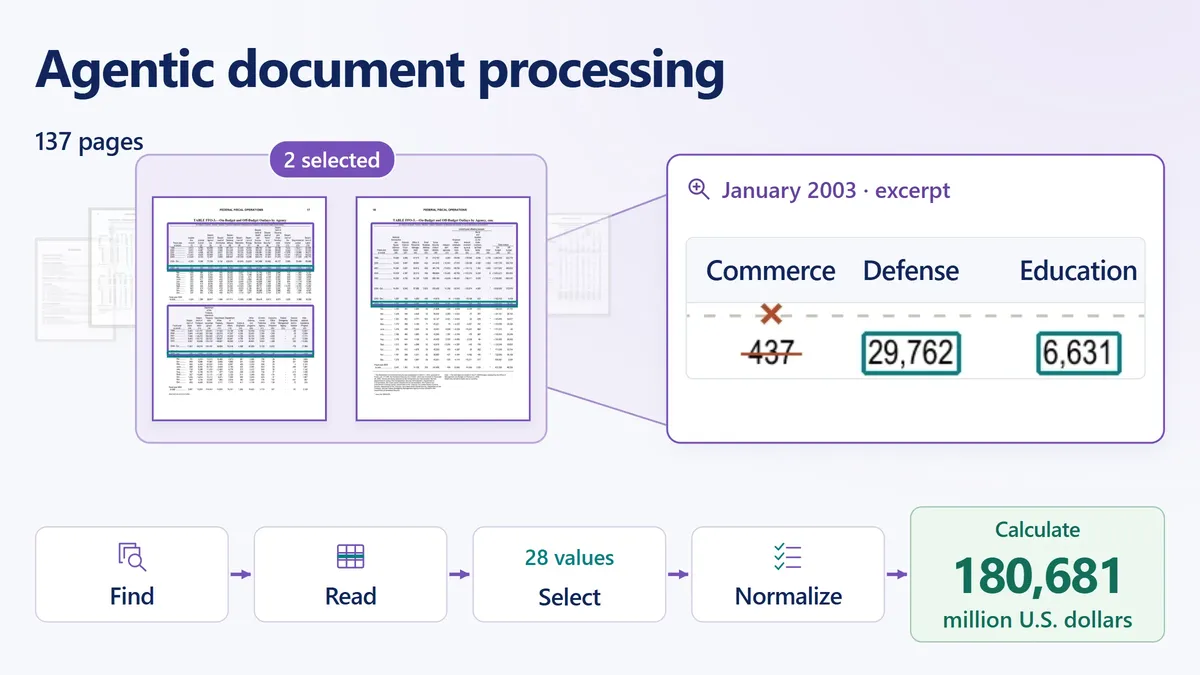
In one example, the requested result is January 2003 agency outlays from U.S. Treasury data, with specific exclusions. The relevant table spans two pages in a 137-page bulletin, and the system must follow the January row across column bands while keeping each amount connected to its agency heading.
The task also requires leaving out receipts and reported totals, removing the r marking a revision, and preserving minus signs. After selecting and normalizing the relevant values, a calculator produces a result of 180,681 million dollars.
Microsoft says a single model pass would have to manage page relationships, exclusions, notation and arithmetic at the same time. Agentic mode instead plans the work, uses document-specific tools to navigate and check the table, and calculates the answer from the selected evidence.
Charts and long tables require different checks
Microsoft also demonstrates agentic mode with four economic charts in a 20-page excerpt. The workflow fills seven fields covering values and years for GDP growth, payroll change and unemployment, as well as the year when short-term interest rates began trending down. Interpreting each chart requires its plotted values, subtitles, axes and surrounding prose, so the system can revisit the source when a chart is ambiguous.
A separate network-log example uses a table that continues across 19 pages. The system must consolidate the rows, ignore repeated headings and apply different operations: count every event, count only Critical events, or select Link Down events and add their durations. Microsoft says event IDs contain gaps, making it necessary to count the actual rows rather than infer the total from the first and last IDs.
How to try agentic mode
Microsoft recommends starting with standard mode and testing agentic mode on representative files when a workload involves evidence synthesis, calculations or reconciliation, exhaustive analysis of long documents, complex conditions or challenging visual structures. Users are advised to choose agentic mode when the quality improvement justifies its additional cost and latency.
In Content Understanding Studio, users can create a project and select 2026-06-01 (Preview) as the API version. Under Workflow kind, they can choose Agentic Extraction, define the fields and test the project with their own document. In code, Microsoft says to use 2026-06-01-preview and add "workflow": "agentic" under config in the analyzer definition.
Microsoft Foundry: When one pass isn’t enough: agentic mode in Azure Content Understanding