Microsoft Foundry's browser automation tool for AI agents is now generally available
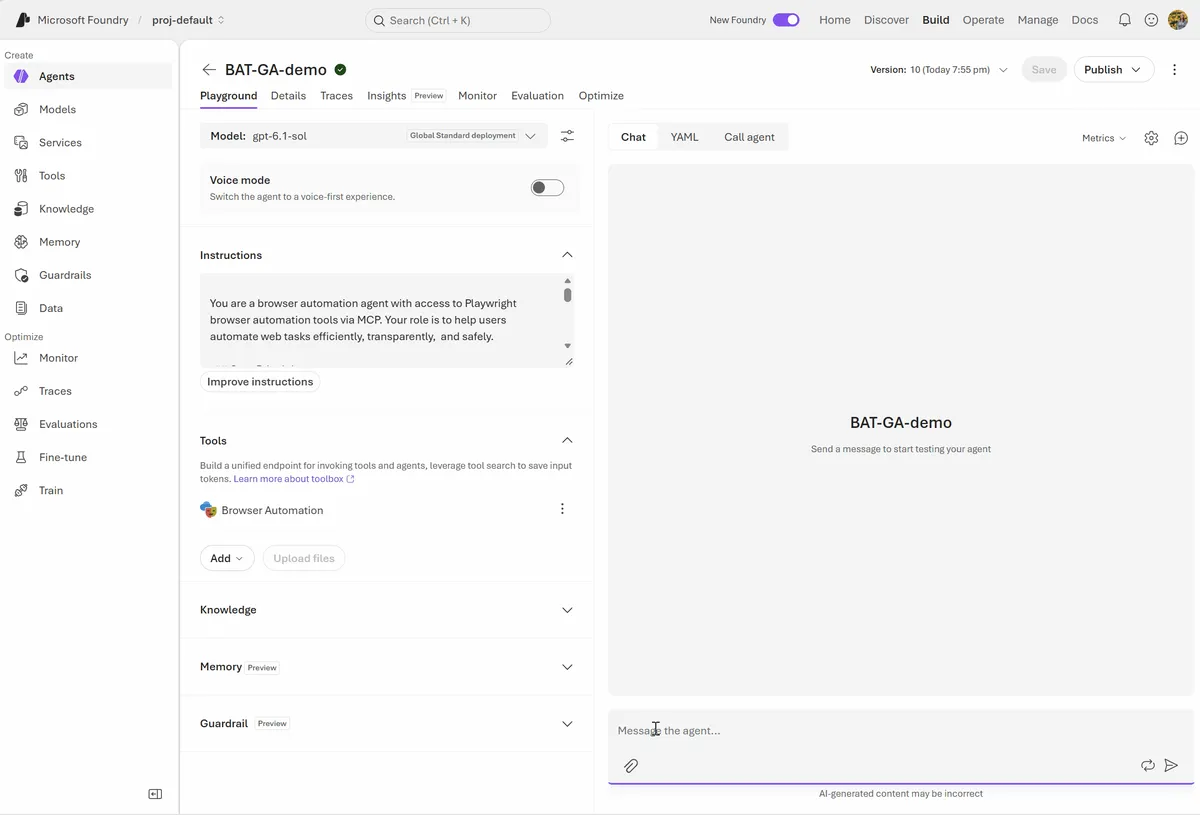
Microsoft has made the browser automation tool in Microsoft Foundry generally available. According to Microsoft, it gives AI agents a managed browser to navigate websites, inspect content, complete forms and run multistep workflows from natural-language instructions.
- Microsoft Foundry's browser automation tool is now generally available, giving agents a managed cloud browser.
- It runs on Playwright Workspaces, which must be provisioned separately as an Azure resource.
- Agents can reach public sites and private apps behind an Azure virtual network.
- Live View and Take control let people watch and steer agent browser sessions.
- Approval requirements, tool allow lists, Entra identities and Azure RBAC limit what agents can do.
A managed browser for agents
Microsoft frames the release around a gap: agents can reason over data, call APIs and coordinate complex workflows, yet many business processes still run through websites. The company names internal portals, administrative consoles, vendor systems, dashboards and applications without complete API coverage.
The tool is powered by Playwright Workspaces, which provisions and manages isolated cloud browser sessions on demand. Developers do not need to install browser binaries or operate browser infrastructure inside the agent environment. Playwright Workspaces must be provisioned separately as an Azure resource.
Agents work through an observe-and-act process. They inspect the current page, pick a browser operation, perform it and verify the resulting state before continuing. Microsoft says this helps agents cope with dynamic content, page rerenders, dialogs and changing application flows.
The tool works with several ways of building agents in Foundry:
- Prompt agents: the fastest route, configured with instructions, a model and tools.
- Hosted agents: browser automation combined with custom orchestration built with Microsoft Agent Framework or another framework.
- GitHub Copilot harness support: a managed way to build a complex, long-running agent.
Public and private sites, plus toolbox integration
Microsoft notes that enterprise workflows rarely live entirely on the public internet. The tool can interact with public websites and with private applications protected behind an Azure virtual network. With Playwright Workspaces private network connectivity, an agent can move across public and internal systems in one workflow while the organization's network boundaries stay in place. The private network connection must be added when the Playwright Workspace is provisioned.
Scenarios listed by Microsoft include:
- Processing information across internal and external business portals
- Automating employee onboarding and IT administration workflows
- Retrieving data from vendor sites and entering it into private applications
- Investigating customer issues across public experiences and internal support tools
- Automating legacy systems that do not provide modern APIs
Teams can use Microsoft Entra identities and Azure role-based access control to give agents only the access each workload needs.
The tool is natively integrated with Toolboxes in Microsoft Foundry, which Microsoft describes as a reusable way to curate, govern and share tools across agents. Developers add the browser tool to a toolbox, publish it and connect it to Prompt agents or Hosted agents through an MCP-compatible endpoint. The announcement includes a Python sample that does this and asks an agent to look up the year-to-date change for MSFT on a finance site. Listed benefits include standard MCP-based tool discovery, reusable configurations, centralized identity and connection management, tool allow lists, approval controls, and tracing in Foundry.
Human oversight and governance
Because browser actions can affect real systems, Microsoft built in controls for bounded and reviewable workflows. Developers can start with navigation and page-inspection tools, then enable state-changing capabilities such as clicking, typing, form filling or file upload only when a scenario requires them.
Two features keep people in the loop. Live View lets developers and operators watch an active browser session in real time, see where the agent goes and understand why a workflow is blocked. Take control lets a person interact with the browser directly, for example to resolve an unexpected page state or complete a supervised step, before handing control back to the agent.
Organizations can require approval before sensitive or state-changing operations, limit agents to the browser tools a task needs, use isolated sessions per workflow, and apply least-privilege access with managed identities and Azure RBAC. Microsoft advises treating web content as untrusted input, keeping system policies separate from page content, validating sensitive destinations and requiring human approval for consequential actions.
Foundry traces can contain sensitive data, including prompts, model responses, system instructions and tool-call arguments or results. Microsoft points to guidance for routing such content to the dedicated AppGenAIContent table and protecting it with a deny-by-default access model. That protection workflow is currently documented as a preview capability, so Microsoft says to review its requirements before production use.
What it means for teams building agents
For organizations that already build agents in Foundry, the general availability means web interfaces no longer have to be a stopping point. Systems without full API coverage, including legacy tools and private portals, can become part of an agent workflow, with network, identity and approval controls attached.
To get started, Microsoft says to create or select a Playwright Workspace, connect the browser automation tool to a toolbox in Foundry, and add the toolbox to an agent. The post links to documentation, a hosted agent deployment guide and samples. The source does not state pricing or regional availability.
Microsoft Foundry: Browser automation tool in Microsoft Foundry is now GA