Picsart launches Capture & Create, a Chrome extension for saving references and making AI media
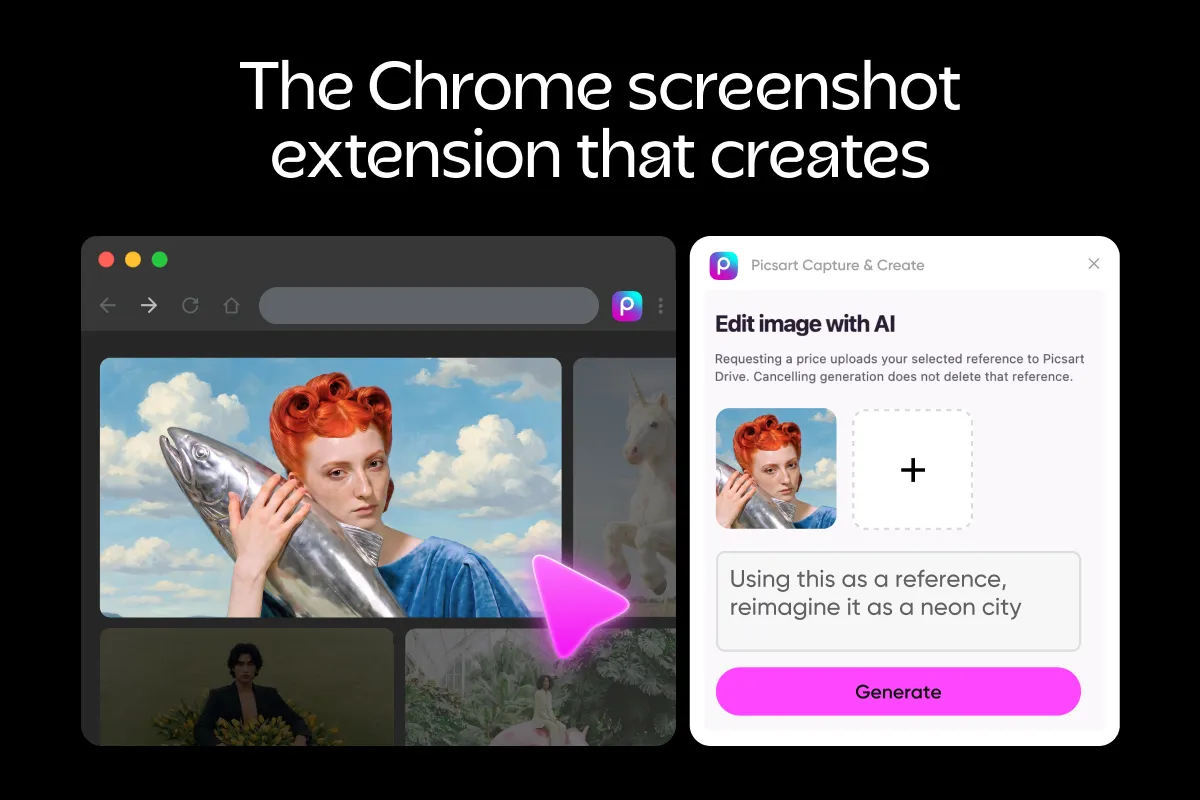
Picsart has released Capture & Create, a Chrome extension that lets users take screenshots, clip images from webpages and record short silent screencasts from one side panel. According to Picsart, saved references can then be turned into AI image or video ideas, and the extension is now live in the Chrome Web Store.
- Picsart Capture & Create is now available in the Chrome Web Store.
- It captures screenshots, clips supported images and records silent area screencasts, saving them to Picsart Drive.
- Screencasts are WebM clips limited to 120 active seconds and 25 MB, with no audio or full-desktop recording.
- AI generation requires a Picsart account and credits, and users must approve the credit terms before anything runs.
- Saved videos can be passed to AI Video Clipping, but the extension does not download YouTube videos or bypass protected streams.
Capture, clip and record from one side panel
Picsart describes Capture & Create as a tool for people who collect visual ideas while they browse. Users can capture the visible part of a page or select a screenshot area themselves. The side panel also lists supported images and video thumbnails from the current page, which can be picked and saved to Picsart Drive as references.
Picsart is clear about what the tool is not. It saves selected media for creative use, and it does not archive full articles, copy entire websites or work as a read-later app. Full-page scrolling capture is not part of the extension either.
The extension also includes a selected-area screen recorder. Users choose an area, check the preview, record, pause and resume, then trim the start and end of the clip. The result can be downloaded or saved to Drive. Recordings are silent WebM clips, capped at 120 active seconds and 25 MB, and the side panel must stay open until recording finishes. Audio, microphone and full-desktop recording are not included, and protected content may appear blank.
From reference to AI image or video
Once a reference is saved, users write a description and prompt in their own words. They can then edit the image with AI, explore a similar image, or use the reference as the starting point for a video. They also choose an available model, style and settings.
Before any generation runs, the extension shows the credit terms and asks for approval. If the exact cost is not available, a separate approval step covers that unknown charge. According to Picsart, selecting a reference or a model on its own never starts a generation. Generated files are stored in the selected Picsart Drive folder, next to the saved references.
Descriptions are manual in this version, so the extension does not analyze a video and write a creative brief. Picsart also advises reviewing each result before using it publicly.
For supported saved videos, the extension connects to AI Video Clipping, Picsart's online video clipping tool. The clipping happens in the Picsart web app. Capture & Create does not create highlight clips itself and does not bypass protected video streams. It is not a full-video YouTube downloader: on YouTube, support is limited to available thumbnails and capturing what is visible on screen.
Who it is for and what to know before using it
Picsart points to three groups. Designers can clip exact spacing, color or layout details, or record an interaction for a developer or client. Marketers can gather campaign references in Drive and use their own brand images as starting points for AI variations. Online sellers can capture their product listings, save product images and test new backgrounds or settings before committing to a full reshoot.
Setup involves installing the extension from the Chrome Web Store, opening a supported page and clicking the Picsart icon to open the side panel. A connected Picsart account is needed for Drive saves and online creation. AI features use credits, and cost and availability depend on the chosen model and settings. According to Picsart, there is no fixed free-credit or free-video allowance.
On privacy, Picsart says that when a user takes an action, the selected files, relevant source information and prompts are sent to Picsart as needed to complete it. Preparing a generation reference can upload it before the user approves the generation, and canceling does not delete files already saved to Drive. Picsart also asks users to use media they own or have permission to reuse.
For users, the extension keeps reference gathering and first-draft AI experiments in the browser and in one Drive folder. Its limits, including silent short recordings, visible-area capture only and manual descriptions, define where it fits.
Picsart: Chrome screenshot extension: meet Picsart Capture & Create