Roboflow Lets Users Fine-Tune NVIDIA Cosmos 3 Edge on Their Own Video
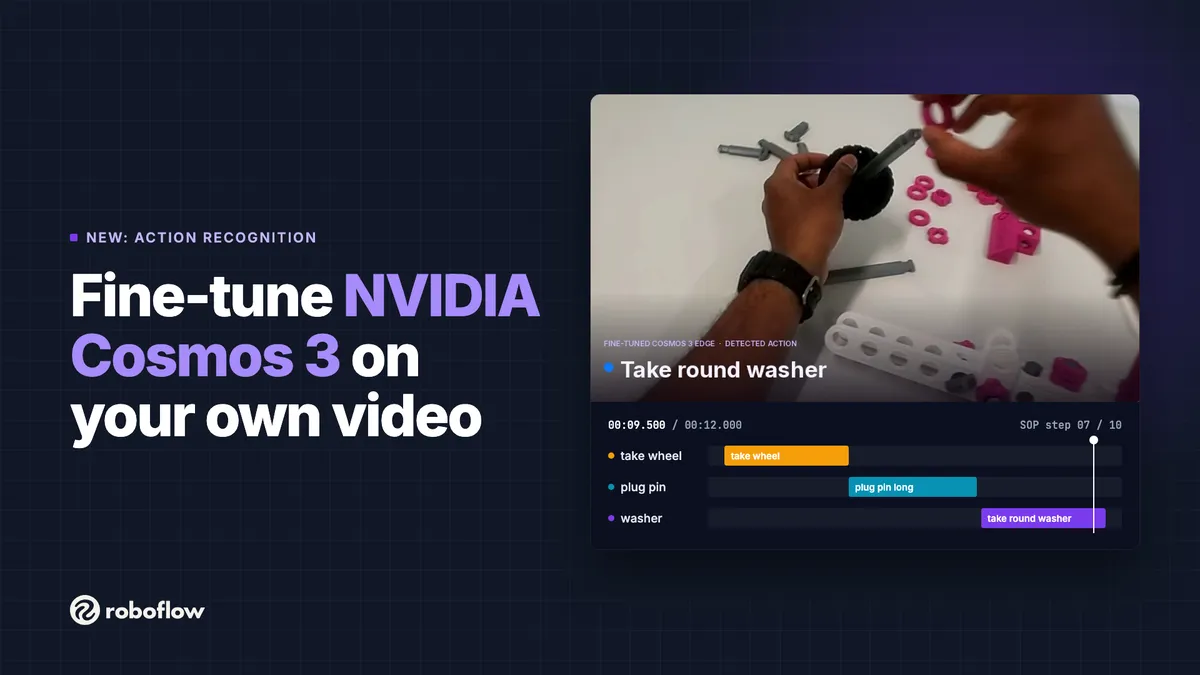
Roboflow now lets users fine-tune NVIDIA Cosmos 3 Edge on their own video data. The new Action Recognition project type returns a timeline of actions for any new clip, so teams can check whether workers followed a procedure.
- Roboflow now supports fine-tuning NVIDIA Cosmos 3 Edge on custom video through a new Action Recognition project type.
- Users label time ranges on a timeline, and the trained model returns a timeline of actions for new clips.
- Roboflow says a few dozen short videos are enough to start.
- Defaults are 64 frames per window, 4 fps and 360p, giving 16-second windows.
- Models run through the Serverless Cloud API, and the base Cosmos 3 Edge is also available in Workflows.
What Action Recognition does
According to Roboflow, Cosmos 3 Edge already reasons well about physical scenes out of the box. A general model, however, does not know a specific production line, its parts, or the order in which operators are supposed to work. Fine-tuning is meant to teach the model those actions.
Action Recognition means finding which actions happen in a video and when. Roboflow says a tuned model can answer questions such as whether an operator finished every step of an assembly procedure in order, how long each step takes, where cycles slow down, and whether a step was skipped, repeated or done out of sequence.
As a demonstration, Roboflow trained a model on footage of people assembling a toy car, using the IndustReal dataset (Schoonbeek et al., WACV 2024, Apache-2.0, modified). For each new clip, the model marks which of the 10 assembly steps is happening and when. Placed next to a standard operating procedure (SOP), the output can flag a skipped, doubled or out-of-order step with a timestamp. Roboflow says the same setup works for kitting, packing, machine changeovers and quality checks at a station.
From labeling to training
The workflow starts in app.roboflow.com, where users create a new project and choose "Action Recognition". Roboflow advises uploading clips from the camera that will run in production, with the same angle and lighting. According to the company, a few dozen short videos that each show the full task are enough to start, and more can be added later for retraining.
Labeling does not use bounding boxes. Instead, users drag across a timeline row to mark when an action starts and ends, then name the class. Each class has its own row, so one video can hold many actions. Edges can be dragged, or set frame-exactly with "Set In" and "Set Out". Roboflow recommends starting a segment on the first movement of an action, ending it when the action is done, and leaving out idle time.
Once videos are labeled, users create a dataset version, click "Train on This Version" and pick "Cosmos 3" with model size "Edge". Compared to V-JEPA 2.1, Roboflow says Cosmos 3 Edge trains slower but uses more motion and time context. That helps when two steps look alike in a single frame and differ only in how they move.
The defaults work for most projects, according to Roboflow. Those who want to tune a run can open "Customize Training Recipe":
- Sliding Window: cuts each video into windows instead of showing it whole, recommended for long videos.
- Frames per Window: default 64.
- Sampling Rate (fps): default 4, the rate Cosmos 3 was released for.
- Frame Resolution: the long side of each frame, from 240p to 720p, default 360p.
With the defaults, each window covers 16 seconds of video, and Roboflow says a window must be long enough to hold the longest action. A "Ready to train" panel shows estimated credits and training time, and a "Credit Cap" stops the run when it reaches a set budget. Users can also start from an earlier checkpoint or change the number of epochs.
Running the model and what it means
When training finishes, users receive an email and the model appears under "Models". They copy the model ID and send a clip through the Serverless Cloud API, for example with the inference_sdk client and its infer_on_video call. The response contains a timeline of the actions found.
Roboflow suggests comparing that timeline with the SOP: check that every step is present, in the right order, and within its target time. The result can be sent to a dashboard, a line alert or an MES. Users who prefer to ask about a scene in plain language can use the base Cosmos 3 Edge model, which is also available through the API and as the "Cosmos 3" block in Workflows.
For manufacturing and logistics teams, the release offers a way to turn station video into step-by-step timelines without drawing boxes frame by frame. Roboflow invites users to sign up, or to talk to sales about running it across multiple sites.
Roboflow: Fine-Tune NVIDIA Cosmos 3 Edge on Your Own Video