Ultralytics adds S3-to-hosted API workflow for YOLO26
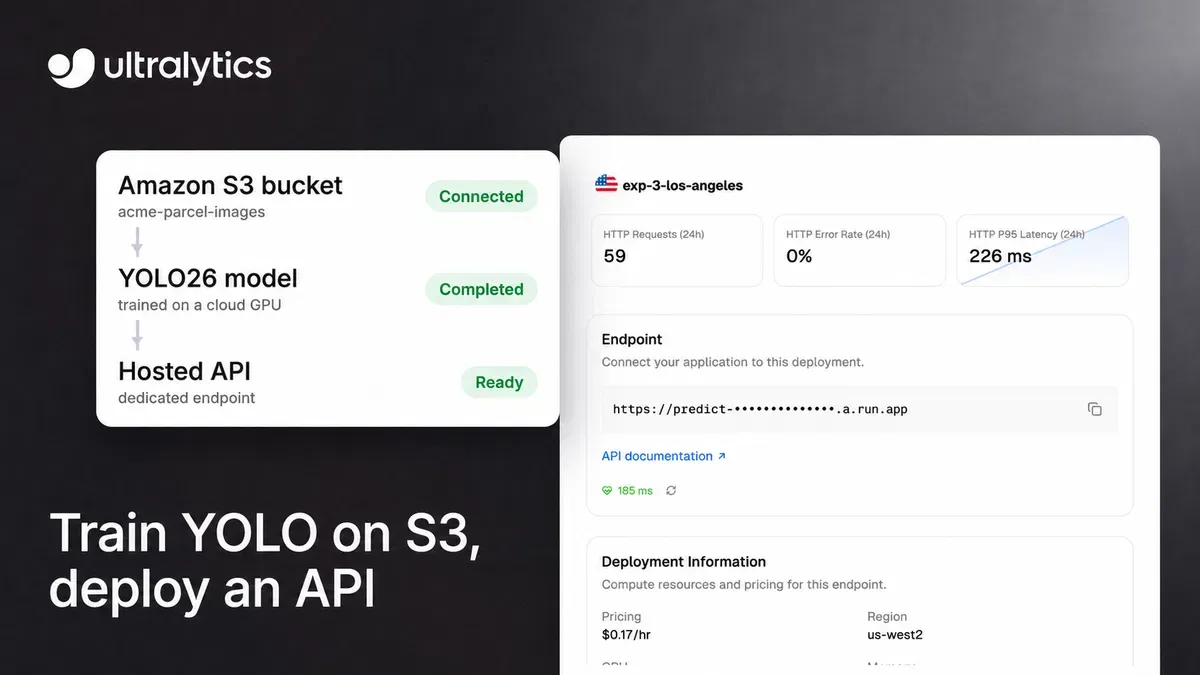
Ultralytics Platform now provides a step-by-step workflow for training YOLO26 on images stored in Amazon S3 and deploying the resulting model as a hosted API. The process keeps the original images in the bucket while using temporary copies during cloud training.
- Ultralytics Platform can index Amazon S3 images without storing a second copy.
- Users can train YOLO26 on an Ultralytics Cloud GPU.
- Models can be deployed to dedicated endpoints in 42 regions.
- The default endpoint size is free and scales to zero when idle.
- S3, Google Cloud Storage and Azure Blob Storage datasets require Pro or Enterprise.
Training from an existing S3 bucket
The workflow is designed for teams that already keep computer vision data in Amazon S3. Users connect a bucket with a read-only AWS IAM user, index a folder as a Platform dataset, and either retain existing YOLO labels or create annotations in the browser. Ultralytics says Platform does not store a second copy of indexed images, although cloud training uses temporary copies for the duration of a run.
The dataset index can recognize images in .jpg, .jpeg, .png, .webp and .avif formats. YOLO text labels, a data.yaml file and train, validation and test folder names can be used to identify labels, classes and splits. A single import indexes up to 500,000 objects. Ultralytics advises creating a new dataset when additional objects are uploaded because the index is created once.
The same process supports detection, segmentation, pose and oriented bounding box datasets. Ultralytics also says the flow works with Google Cloud Storage and Azure Blob Storage, using the corresponding cloud credentials instead of an AWS access key.
Cloud training and dedicated deployment
After creating or reviewing the dataset, users can choose an official Ultralytics model, with YOLO26 recommended, or one of their own models for fine-tuning. They can set the number of epochs, image size and batch size, then select a GPU from Ultralytics Cloud. The training interface displays the hourly rate and estimates the run's duration and total cost before the run starts. Metrics, console output and system charts stream to the browser, while checkpoints are saved automatically.
When training is complete, the model can be deployed from its Deploy tab. Ultralytics lists 42 regions and sorts them by measured latency from the user's location. A default deployment uses 1 vCPU and 2 GiB of memory, is free, and scales to zero when idle. Custom deployments can use up to 8 vCPU and 32 GiB, keep one warm instance and incur the displayed regional hourly rate from readiness until the endpoint is stopped, including idle time.
Each dedicated endpoint is single-tenant, has its own URL and monitoring, and is tied to one API key from the workspace. Deployment limits are 3 for free workspaces, 10 for Pro and unlimited for Enterprise.
What users need to know before connecting data
Amazon S3, Google Cloud Storage and Azure Blob Storage datasets require a Pro or Enterprise workspace. Ultralytics lists Pro at $29 per seat per month, including $30 of credit per seat each month for metered compute such as cloud training. Connecting cloud storage also requires a workspace admin or owner role and an AWS IAM user that can list and read the bucket.
Ultralytics says Platform encrypts the AWS key at rest with AES-256-GCM and does not expose it to training workloads. The service does not modify or delete bucket objects. An AI features switch is enabled by default, allowing Ultralytics GPUs to read images for annotation, similar-image search and cloud training. The company says users can turn the switch off, after which no new AI work starts, while running work finishes.
Once deployed, the model can receive HTTPS requests with an API key. The endpoint also provides interactive documentation at /docs and a health check at /health. Request bodies are limited to 32 MB, and requests that cannot be served promptly receive a 429 response with a Retry-After header.