Picsart Flow adds AI video translator with voice cloning and lip-sync
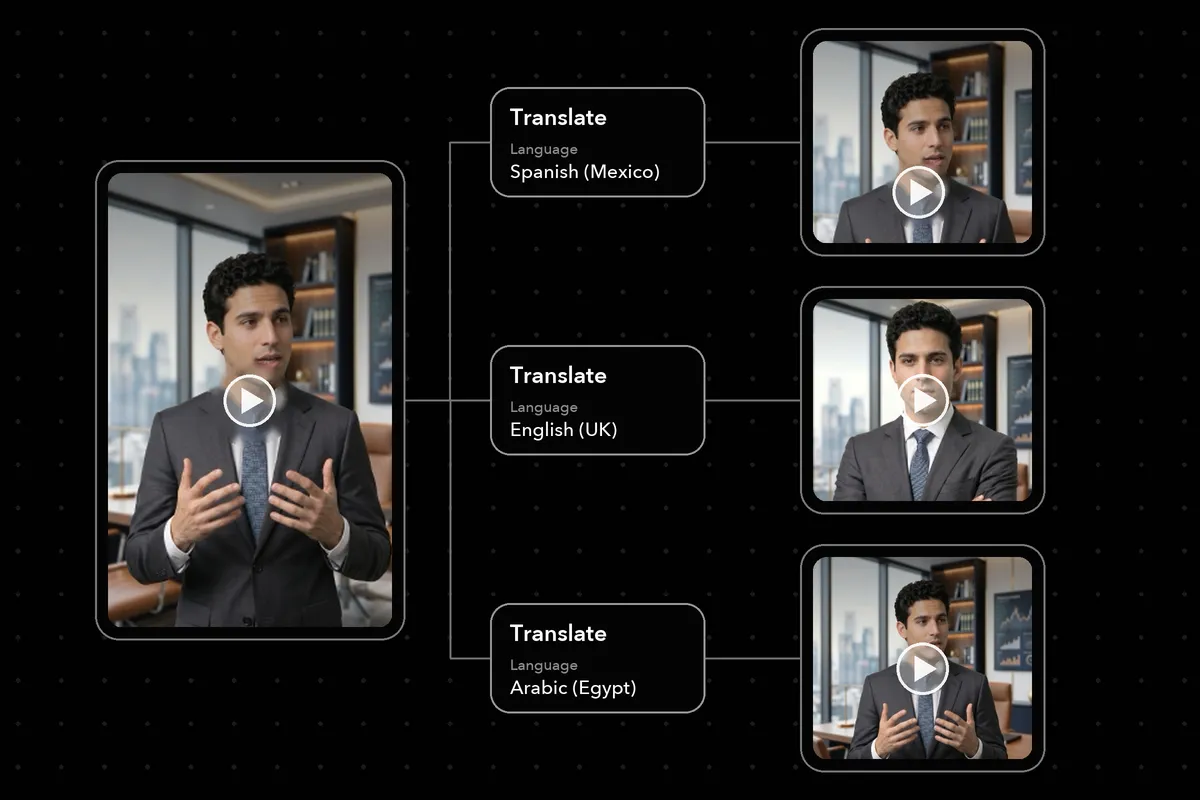
Picsart Flow now includes a Translate node that turns a video with speech into a dubbed version in another language, keeping each speaker's voice and matching the lips to the new words. According to Picsart, the feature is live now on the Flow canvas.
- Picsart Flow has a new Translate node that dubs videos with voice cloning and lip-sync.
- It offers 190 target languages, including regional variants such as Spanish (Mexico) and English (UK).
- Speed mode gives fast turnaround with standard lip-sync; Precision re-renders mouths and adds context- and gender-aware translation.
- Each run produces one language; users branch several nodes from one clip for multiple languages.
- Cost depends on video length and mode, and the estimate shows on the node before running.
One node handles the whole dub
Picsart says the Translate node carries a video through the entire dubbing process in a single run. Flow detects the spoken language, translates the speech into the chosen language, clones the voice of each speaker and re-syncs the lips so the mouths follow the translated words rather than the original ones.
The company argues that this addresses the two things that usually give a dub away: a stranger's voice, or a mouth that keeps moving after the sentence has ended. The result, according to Picsart, looks and sounds as if the original had been recorded in the new language.
One video goes in and one translated video comes out. The dub appears on a new node next to the original, so both versions sit side by side on the canvas and can be played back to back.
The node accepts MP4, MOV or WebM files of at least 2 seconds with clearly audible speech.
190 languages, two modes, no transcript
The Language picker offers 190 target languages, and regional variants get their own entries. Picsart lists Spanish (Mexico), English (UK), Chinese (Cantonese, Traditional) and Arabic (Egypt) as examples. Each language receives the full treatment: translated speech, cloned voices and re-synced lips.
Setup is minimal. There is no transcript to upload, no prompt to write and no field for the source language, since Flow detects it automatically. The Language picker is the only required choice, along with a mode.
The node has two modes:
- Speed: standard lip-sync and fast turnaround.
- Precision: re-rendered mouths for high-quality lip-sync, plus translation that is context- and gender-aware.
Picsart recommends Precision for clips where the speaker's mouth is front and center and where the translation needs to follow context and gender. Speed suits cases where turnaround matters most and standard lip-sync is enough.
Branching for multiple markets and cost estimates
Each run produces a single language. To release the same video in several markets, users branch one Translate node per language from the same clip. Every branch is a separate run and delivers its translated video on its own node next to the original. The mode is set per node, so one language version can use Speed while another uses Precision. Adding a further language later means adding one more branch from the same clip.
According to Picsart, cost scales with the length of the source video and the chosen mode. A longer clip costs more than a shorter one in the same mode, and switching modes changes the price as well. The estimate is shown on the node before the run, and each node carries its own estimate, so a clip branched into five languages means five separately priced runs.
Canvas updates and what it means for users
Two canvas upgrades ship alongside the node. The right-click menu now opens in two columns, with what to create on the left and what to do with it on the right. Translate and Captions are offered wherever a video can connect: on the canvas, on a video node or on a video lane.
For creators and teams working in Flow, the release means localizing a video no longer requires a separate transcript, a declared source language or written instructions. Picsart's pitch is that one clip can be turned into a set of language versions on a single canvas, with a visible price before each run. The company advises starting with clearly audible speech, since the node works from the speech in the clip.
Picsart: Picsart Flow now has an AI video translator with lip-sync