Ultralytics adds built-in image tiling for small-object detection
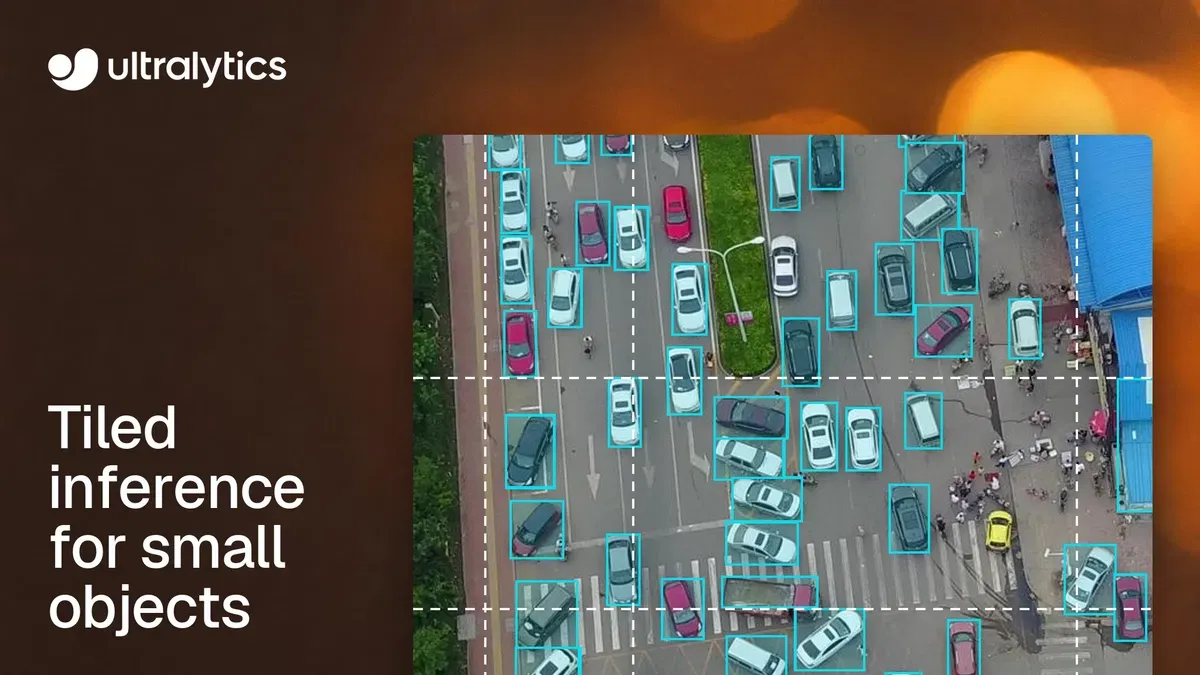
Ultralytics has added built-in image tiling to its YOLO tooling, allowing models to analyze overlapping windows of high-resolution images instead of shrinking each frame into one model input. The company says the approach can recover small objects in aerial, traffic and inspection imagery, but requires more model inputs per frame.
- Tiling processes overlapping, native-resolution windows instead of one shrunken image.
- Ultralytics reports 161 detections with tiling versus 35 without it on one VisDrone frame.
- A 1920 x 1080 frame with tile=640 uses eight windows.
- Python support starts with Ultralytics 8.4.204, and Rust support with Inference 0.0.57.
- Tiling can help small-object detection but increases computation and can split large objects.
Why shrinking images can hide small objects
At the default imgsz=640, a 1920 x 1080 image is reduced before Ultralytics YOLO processes it. According to Ultralytics, a pedestrian that is 15 pixels tall in the original frame becomes about 5 pixels tall after resizing, leaving the model with less detail to distinguish the object from texture and noise.
Image tiling instead runs the model on overlapping windows at the original image resolution and merges the resulting predictions. In one VisDrone example, Ultralytics says YOLO26s returned 35 detections from the whole image at imgsz=640, compared with 161 detections using tile=640. A second validation frame produced 8 detections without tiling and 128 with it. The company stresses that these are prediction counts, not a scored evaluation.
The method is aimed at imagery in which objects occupy only a small part of a large frame, including drone and satellite images, overhead traffic scenes, crowds, wide retail-shelf photographs and high-resolution inspection images.
More detail comes with more model inputs
Ultralytics says tiled windows overlap by a base 20 percent. The final row and column align with the image boundary, which can create greater overlap at the edges. A 1920 x 1080 frame processed with tile=640 uses eight windows, arranged four across and two down. A 3840 x 2160 frame with tile=640 uses 32 windows.
That makes tiling more computationally demanding than a single whole-image pass. Raising the whole-image input to imgsz=1280 also increases compute, while smaller tiles can increase the number of inputs further. Ultralytics says batching can improve throughput, but recommends measuring latency on the target hardware.
Tiling is not suitable for every scene. Objects larger than the overlap can be split between windows, and the merging process does not join separate fragments. Smaller windows can also enlarge background clutter and produce false positives. The guide recommends comparing two or three tile sizes on a validation set and monitoring precision as well as recall.
Python and Rust support
The Python package supports tiling from Ultralytics 8.4.204, released on November 6, while the Rust crate added a --tile flag in Ultralytics Inference 0.0.57 on November 9. Python users can pass tile=True to use imgsz as the window size, or provide an integer for a separate tile size. The same setting is available through the command line, and batch controls how many windows are processed together.
After inference, window predictions are mapped back to source-image coordinates and returned as one Results object per original image. For detection, overlapping predictions are filtered with non-maximum suppression using the configured iou, agnostic_nms and max_det settings.
Ultralytics says the Python pipeline also supports tiled prediction for YOLO-World, YOLOE, RT-DETR and FastSAM. Detect, segment, pose and OBB outputs are merged according to their task, while semantic segmentation, depth and classification use their own approaches for overlapping tiles. The company also describes tiled training and validation, with labels clipped to windows and predictions merged before validation scoring.