Arize Phoenix now updates LLM model prices automatically
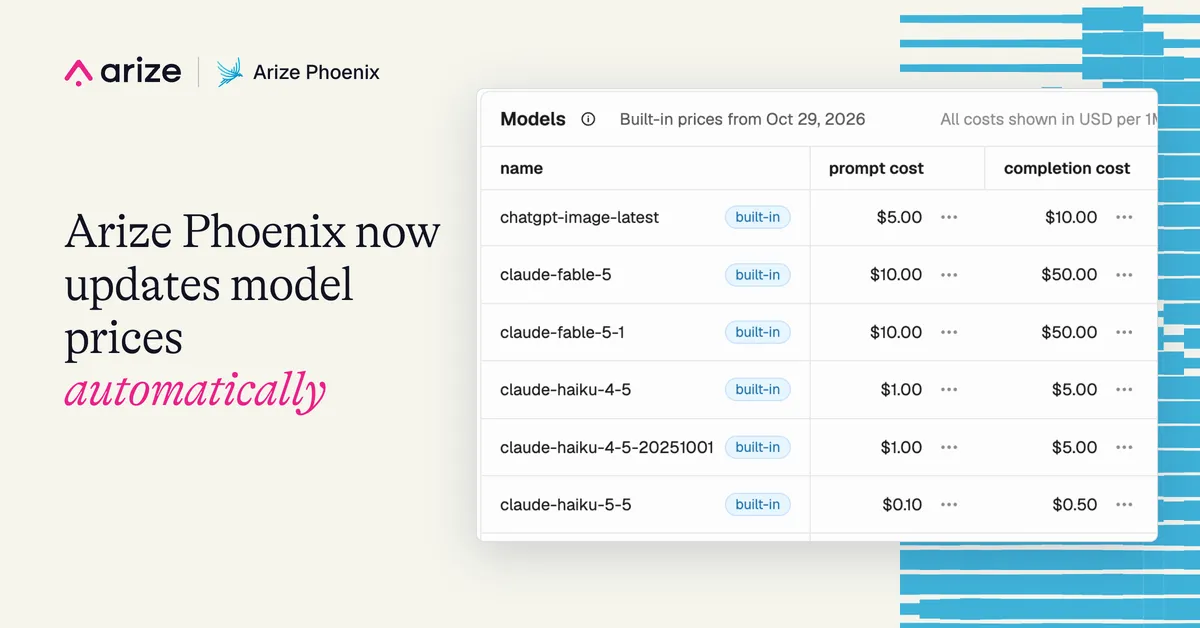
Arize Phoenix, the open source agent observability tool, now updates its built-in model prices automatically, so servers no longer need a Phoenix upgrade to receive new or revised rates. According to Arize, the feature is on by default.
- Arize Phoenix now downloads updated model pricing automatically, with no upgrade required.
- The server checks shortly after startup and then about once a day, using a catalog generated from LiteLLM's model price list.
- Updated rates apply only to new spans; existing trace costs are not recalculated, and custom prices take precedence.
- Automatic updates are on by default and can be disabled with PHOENIX_DISABLE_MODEL_COST_AUTO_UPDATE=true.
What changes for cost tracking
Phoenix uses a pricing catalog to calculate the cost of LLM calls in traces. For each call, it applies the model's token rates to the recorded token usage and adds the result to the trace total.
Until now, built-in pricing updates shipped only with Phoenix releases. If the catalog lacked a model's pricing, users had to upgrade Phoenix or add a custom configuration. With automatic updates, a server can receive new pricing between releases.
Users can see which catalog is active under Settings > Models, where a label reads Built-in prices from. Arize notes that the date next to it shows when the catalog was generated, not when the server last checked for updates.
How the background update works
Shortly after startup, the server checks for a newer catalog, then repeats the check about once a day. The checks run in the background, so no restart is needed. The catalog is downloaded from the Arize Phoenix repository on GitHub. Arize says it generates the file from LiteLLM's model price list and publishes it as JSON.
Phoenix compares the generation date of the downloaded catalog with the one in use. If the download is newer, it saves the model entries and token prices together in a single database transaction and records which catalog it applied. After a restart, that record ensures an older bundled catalog does not overwrite newer prices already downloaded.
For setups where several Phoenix servers share a PostgreSQL database, a database lock lets one server apply an update at a time. Each server confirms the catalog is still newer before applying it. If a download fails, the server keeps its existing prices, logs the failure and tries again at the next scheduled check. Startup does not wait for the download.
Updated rates apply to newly received LLM spans once the pricing cache refreshes. Costs already recorded on existing traces are not recalculated. Custom prices configured for a model keep taking precedence over the matching built-in prices, which lets teams retain negotiated provider rates.
Opting out and verifying prices
Teams that review pricing changes as part of a release process can turn off automatic downloads by setting the environment variable PHOENIX_DISABLE_MODEL_COST_AUTO_UPDATE=true on the Phoenix server. Deployments that already set PHOENIX_ALLOW_EXTERNAL_RESOURCES=false also have pricing downloads disabled. In both cases Phoenix keeps its existing prices and can apply a newer bundled catalog when Phoenix is upgraded.
Arize suggests three checks once a delivery method is chosen:
- Open Settings > Models to see the catalog date and find the pricing entry for your model.
- Send a new request through an instrumented application, open the trace, and confirm that the recorded model and token counts match the call before reviewing the calculated cost.
- If you use negotiated pricing, confirm your custom configuration contains the rates you expect.
If the catalog is missing pricing a user needs, Arize asks them to share the model and provider in its community Slack.
What it means for Phoenix users
For teams running self-hosted Phoenix, cost figures in traces can now follow provider price changes and new models without waiting for a software upgrade. Teams with stricter change control can keep the previous behavior with a single setting, and those with custom rates are unaffected by catalog updates.
Arize AI: Arize Phoenix now updates model prices automatically